Hi,
I got an error message (see following) when I tried to set up on the client computer and I am not able to see company name. I double checked server name and instance and they are correct.
I got the following issues when I set up in the server:
My server's address # is 8046, so the default soap service port is 8047. We changed it back to 7047, but it still have the error.
Also in server, we are not able to enable SSL. Does it cause the error.
Please help.
Thank you
Green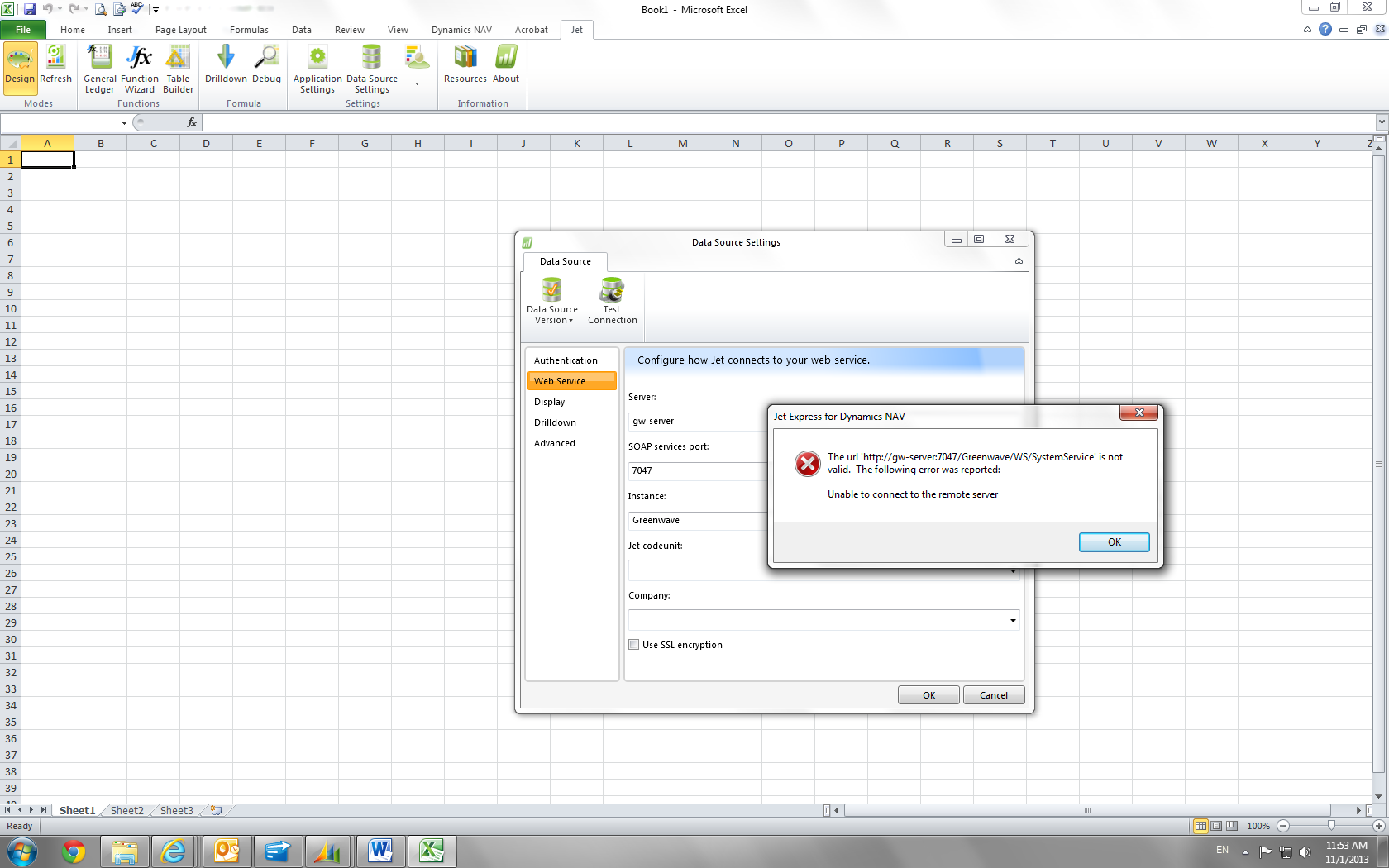
Date
Votes
5 comments
-

Jet Reports Historic Posts Hello,
It is not finding the server at all, so I would try using the servers IP address in place of the server name.
If you can connect this way there is a name resolution problem on the network.
You can use the IP address, but would advise trying to solve the name resolution if possible.
Regards, -
Jet Reports Historic Posts Thanks, Joel. I tried the IP address, but it doesn't work and I got same message. Is there anything else I can do?
Green -
Jet Reports Historic Posts Can you type the URL error from the message box into a web browser and see what the browser returns.
It may give more detailed information as to why it can not connect.
Once the browser is bringing back valid xml information, Jet will start working.
Regards, -
Jet Reports Historic Posts Hi, i have a similar error, when I test the connection, appears this message:
The url 'http://… /DynamicsNAV80/WS/SystemService' is not valid. The following error was reported:
The remote server returned an error: (400) Bad Request.
I put the url on my browser, in Internet Explorer appears: Error HTTP 400
And in Google Chrome appears the xml of the service
But then I tried again in Excel and again appear the same error.
Could you help me please? -
Jet Reports Historic Posts Hello pxttyh,
I noticed that you are utilizing the NAV Web Service, is this because you are connecting to a hosted, cloud or Azure environment?
Is the SQL Server where your NAV database is stored located in an on-premise, local SQL Server?
If so I would strongly recommend switching to the "Dynamics NAV 2013 and later (SQL Server)" Data Source which is now available in Jet Express.
Configuring a data source to NAV 2013 or later through SQL Server:
Requirements for using the Dynamics NAV 2013 SQL Server Connector: http://kb.jetreports.com/article/AA-00915
Configuring Jet Essentials for the Dynamics NAV 2013 SQL Server Connector: http://kb.jetreports.com/article/AA-00902
An HTTP status 400: Bad Request error is a server side error.
This would not be a Jet issue but rather an issue that is happening on the server side.
You can check the Window's Event Viewer logs when this occurs to see if any errors you are being reported.
Unfortunately, we would have no way to determine why this is happening on your system or server.
You can try enabling Jet Application Logging to see if it provides any better details about the error that is occurring.
How to Enable Jet Application Logging:
From the Jet Ribbon > Application Settings > Logging > Enable Jet logging
Please remember to disable Application Logging once the log file has been created as it can negatively impact reporting performance and create large files.
I would also test both the IP address and the server name to ensure that there is not a DNS issue that is occurring.
I would also be helpful to see some screenshots of how your Data Source Settings and NAV Instance are configured.
Best regards,
MWilson
Please sign in to leave a comment.