We want to be prepared when the end of the year comes and we will need to send out 1099’s to vendors. We have a few questions regarding how 1099’s are reported using Loan Vision (product of Navision)
We need a report that provides the vendor name, IRS 1099 code, total amount paid, Federal ID No., mailing address…etc.
Are there any pre-made jet reports that would help us accomplish this goal faster?
Thank you,
Lisa
Date
Votes
2 comments
-

Jet Reports Historic Posts Hello Lisa,
There is not a pre-built report for this, but it should be a fairly easy report to create.
It sounds as though all of the information you need is coming from the Vendor table and you only require a Date Filter.
Take a look at the attached screenshot for an example of how you would create this type of report.
Keep in mind that I am not sure what FlowFields you need so I just used "Payments" as an example.
You can add filters by selecting the Vendor table and then clicking "Add Filter" and making it "User Defined" so that the option can be changed when the report is refreshed.
Best regards,
MWilson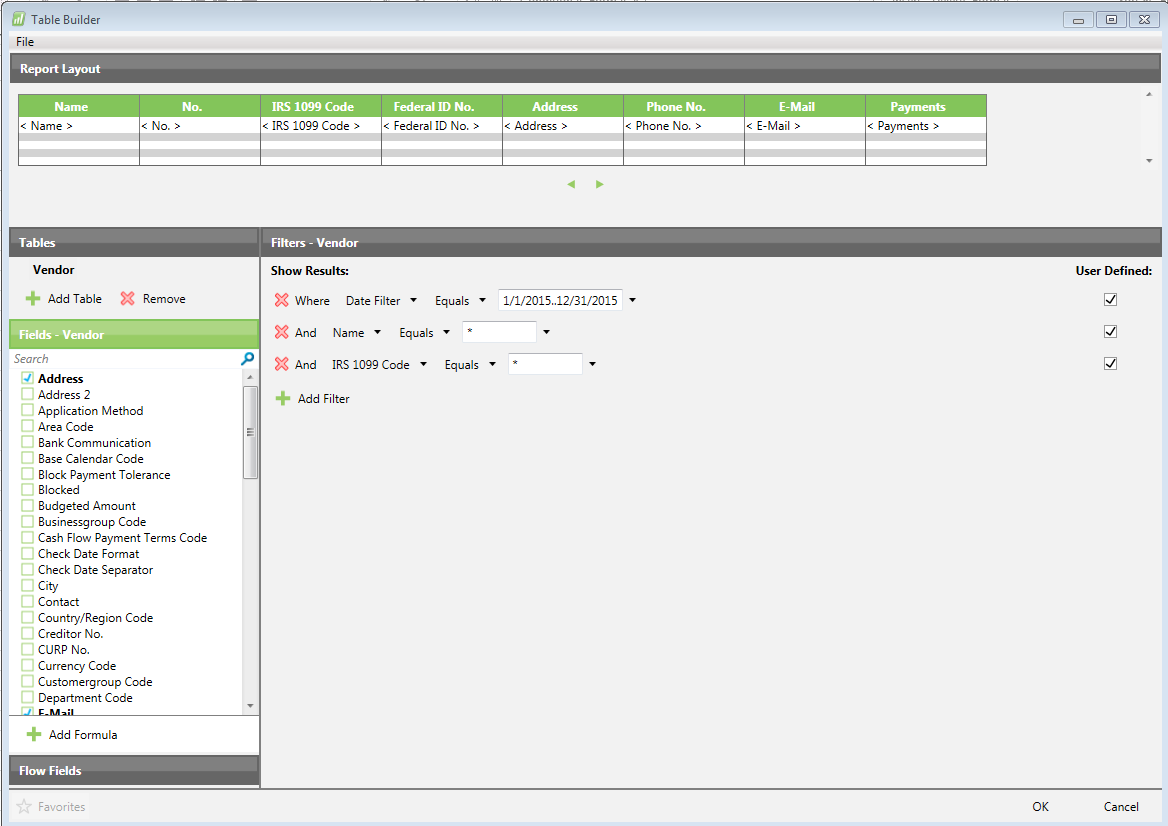
-

Peter Hatzis I am having problems with an old 1099 vendor report created 5 or so years ago. I tried MWilson's method of using the table builder to re-create my old report but don't see the "Payments" field in the vendor table. Is it a calculated field pulling from the vendor ledger table and if so, what is the formula?
My old report was using the below formula, but is only getting payment info on the 1st row of the report, and all the rest of the rows have a "#VALUE!" in the payments column.
=NL("Sum","Vendor Ledger Entry","Amount","Vendor No.",$D5,"Posting Date",$E$2,"Document Type","Payment")
Please sign in to leave a comment.