I'm trying to create a report that lists every purchase order line and the associated vendor number and name. Using the table builder function I linked the two, however when I run the report only the first line item for each purchase order appears. How do I modify the report so all purchase order lines are pulled in? Please help, I'm new at this! :D Here are the formulas:
Links: =NL("Link","Purchase Line",,"Document No.","=No.")
Headers: Buy-from Vendor No. Buy-from Vendor Name No. Order Date Purchase Line - Type Purchase Line - No. Purchase Line - Description Purchase Line - Quantity Purchase Line - Qty. to Receive Purchase Line - Qty. to Invoice Purchase Line - Direct Unit Cost Purchase Line - Amount
Fields: Buy-from Vendor No. Buy-from Vendor Name No. Order Date =NL("LinkField","Purchase Line","Type") =NL("LinkField","Purchase Line","No.") =NL("LinkField","Purchase Line","Description") =NL("LinkField","Purchase Line","Quantity") =NL("LinkField","Purchase Line","Qty. to Receive") =NL("LinkField","Purchase Line","Qty. to Invoice") =NL("LinkField","Purchase Line","Direct Unit Cost") =NL("LinkField","Purchase Line","Amount")
=NL("Table","Purchase Header",$D$5:$O$5,"Headers=",$D$4:$O$4,"TableName=","Purchase Header","Link=Purchase Header",$D$3,"IncludeDuplicates=","True")
Date
Votes
2 comments
-

Jet Reports Historic Posts Hello -
The number of records shown by the NL("Table") function is determined by the primary table used with that function. In your case, this is the "Purchase Header" table. Thus, at most, you would be able to see one record for every record in that primary table.
When wanting to see detailed lines, you need to ensure that your report design uses the detailed table (in this case the "Purchase Line") as the primary table.
You can find more information about using the NL(Table) function [and the Table Builder, in particular] in the "Jet Essentials Videos" article in Jet's online KnowledgeBase (http://kb.jetreports.com/article/AA-00731)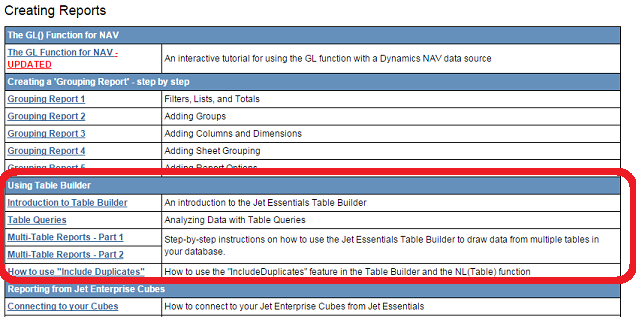
-
Jet Reports Historic Posts Thank you so much! Once I made the switch it worked perfectly.
Please sign in to leave a comment.