I am trying to schedule a batch report to email out using SMTP. We have to use SMTP. If we try emailing through Outlook, the task continues to run in Windows Task Scheduler until we manually shut it down in Task Manager or shut down the computer. I am not able to make SMTP work with the batch report. Anyone have any luck or suggestions?
Thanks,
Joy
Date
Votes
4 comments
-

Jet Reports Historic Posts Hi Joyk,
This may seem like a silly question, but have you set up the STMP settings in the Application Settings?
If so, if you look at your log file of the scheduler, does it provide any error messages? -
Jet Reports Historic Posts Hello Joy,
For the issue with emailing using Outlook, it is recommended that Outlook be closed when executing your tasks. The below Jet Report Knowledge Base article has helpful information on using OUtlook:
http://kb.jetreports.com/article/AA-00800
As indicated by Jet-Btr, validating that you have correctly configured the SMTP settings under the Jet ribbon > Application Settings > SMTP is definitely a good start.
Are you utilizing your organization's SMTP settings or an external SMTP-capable server such as Gmail?
Verify from your Exchange Administrator that your SMTP settings are correct and either use SSL or does not.
Assuming your SMTP settings are configured correctly, enable the scheduler log as shown in the attached image. Then manually run the task by right-clicking on the task and select RUN. If any issue is encountered, this should be logged in the log file. Review this file and post any indicated error messages or share screenshot of the error in this forum.
I hope this was helpful.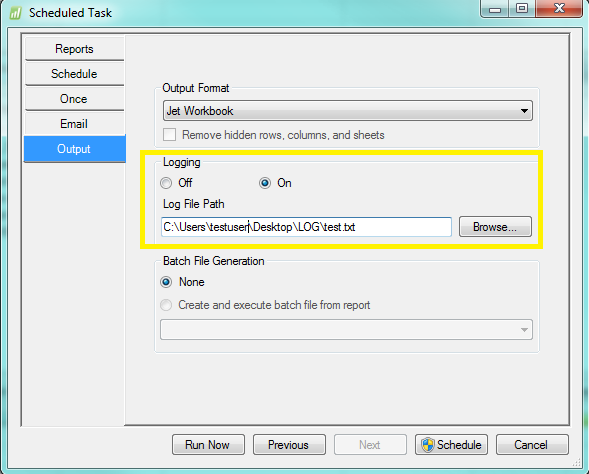
-
Jet Reports Historic Posts Hi All,
We were not having an issue emailing scheduled reports out of Outlook. The reason we needed to switch to SMTP was because after the task ran in Windows Task Scheduler, the task would not shut down. When working with Jet Support, we were told to switch to SMTP and it would take care of this issue.
SMTP has been appropriately set-up in application settings as I am not having issues running and emailing non-batch scheduled reports.
I set-up the log for all scheduled reports to try and troubleshoot. The issue I am having with the batch scheduled job when it is set to SMTP, is it never "logs" anything. I right-click on the task and select Run and it goes to running and then right back to "Ready". There is nothing on the log file to view.
Any other suggestions?
Thanks,
Joy -
Jet Reports Historic Posts Hello Joy, another silly question here…
When I first started running batch reports - I had a terrible time running them from a batch file (where the batch file and the report are separate). If you are running your batched reports this way, do you have the report scheduler options to run as "Jet Workbook" or as "Values Only Workbook"? The immediate run/ready response you are describing is exactly the issue I was having when I scheduled the batch file as a "Values Only" report.
For a batched file, the settings in the batch output tell Jet how to output your batched reports - not the task scheduler (hopefully that explanation makes sense).
Please sign in to leave a comment.