Morning all,
I've done quite a bit of work on an excel sheet (version 2010) which mainly involved changing 'Group Regions And Stores' etc around. Now everytime I hit refresh on Jet it restores the format and cell contents which I save a month ago? As anyone else come cross this.
Thank you.
Dave.
Date
Votes
2 comments
-

Jet Reports Historic Posts Official comment Hi Dave -
Assuming that you made the changes while the report was in Design mode (and not Report mode), it may be that Excel is keeping track of the old info.
A little background…
Under most conditions, when a Jet Essentials report is run, the actual Jet functions (NL, GL, NF, NP) are 'removed' and replaced by the values they return. Excel keeps track of the original functions in a 'safe place backup' so that they can be put back when the report is placed back in Design mode, again. Normally, the 'safe place backups' are removed once the functions have been returned to the actual report. However, sometimes something can happen to prevent Excel/Essentials from being able to do that.
Let's check…
Make sure the report is in design mode.
Make a note of what sheets are listed in Excel.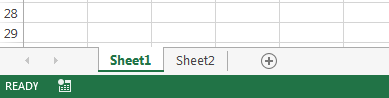
Press Alt+F11 (this will open the Visual Basic for Applications Editor)
See what sheets are listed in the left upper panel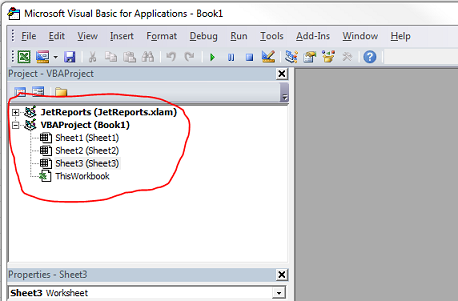
This is the Project Explorer Panel
If it is not there, Press Ctrl+R to have it appear.
Are there other sheets listed that you did not see in the workbook?
If there are, (and they are not stored user data sheets), then they probably need to be removed.
To fix this …
Select each of the backup sheets
And, in the Properties window (Lower left by default)( F4 if it is not present)
Change the Visible property from '2 - xlSheetVeryHidden' to '-1 - xlSheetVisible'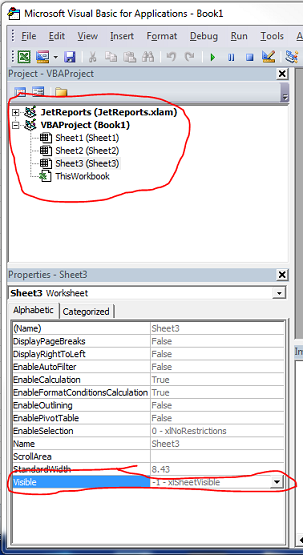
Then, in the normal Excel Window, delete those sheets.
Now, when you run the report, any change you make should remain. -
Jet Reports Historic Posts Thank you very much.
This has been such a pain. You've saved me loads of messing around. Have a Good Xmas.
Dave.
Please sign in to leave a comment.