So I scheduled my first reports to run over night last night after testing them successfully in the day. I scheduled them to email to each of our area managers and this morning they have told me that they all got it but only some of them had information on the report - the rest just come up with the word "values" in most fields. The report is exactly the same for each of them except for the salesperson code changes per report.
I have attached a version of the report for someone it didn't work for and maybe someone is able to advise? I sent the report to them all in a value only workbook as they don't have Jet on their ipads.
Any ideas?
Date
Votes
3 comments
-

Jet Reports Historic Posts I assume that your report includes "Report Options" (i.e., parameters) that change for each of your area managers.
Are you able to manually run the report and duplicate the issue that some of the managers have? If so, by then selecting a cell (with a Jet function) that displays #VALUE!, you can click the DEBUG button on the Jet ribbon to get more information about the issue.
The most common such issue is an "Empty filter not allowed" error. This occurs when Function B is filtered by Function A, but Function A did not return any values. Thus, the filter in Function B is blank or "empty" (and results in a #VALUE!).
If you are not able to duplicate the issue manually (but can duplicate it through running the scheduled task), you can enable the Logging feature (for Jet Professional, as a whole, not just the scheduled task) in the Jet Application Settings: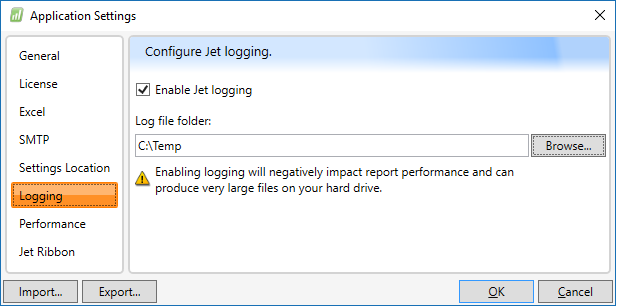
When the task is run, this will produce a series of log files which you can examine (on your own or with the assistance of the Jet Reports Technical Support team) to find the associated error message.
Note: be sure to turn logging OFF when you are done. The files can get very large and creating them has a negative impact on report speed. -
Jet Reports Historic Posts From the original report, the fields where they return with #VALUE is more likely due to "Blanks" that's referencing to another cell. My suggestion is to add the function "IFERROR".
-
Jet Reports Historic Posts If you were to open your original or main report that you're scheduling to run, I would look at the cells that contains #VALUE and click Debug. This is more likely that it is referencing to a table or field that doesn't exist or contains blank.
I would suggest putting in a function "IFERROR".
Please sign in to leave a comment.