Hi All,
We've just had Jet installed as a tool to generate reports from a SQL server database (not NAV or Dynamics, booking data for an appointments system) and we've not had training on the Jet reporting syntax yet so we're using table builder to get data out and generate reports in excel as a stopgap until we get up to speed with that.
I have some tables put together with joins/links and they work fine, but there is one report I need where I can't link the tables I need because the resulting dataset is too large and crashes the system. Yes I could go and get custom views written but that would take agggessss and I need this data out sharpish.
So, what I was trying to do was set up a workbook with one table builder 'result' (the finance data, say) on one tab and one (the booking data) on another, so I can do the combinations in excel and the results on the front page. Inelegant, but I can hide the tabs and the end user never knows the difference.
But If I generate the tables then move them to the workbook, then click through to the second table it only shows the first. It appears that I can't have two tables loading into the same workbook through Jet, which seems odd since aren't they just SQL queries loading into a table through what is essentially an ODBC source?
Am I missing something, or do I have to cut and paste and wait for a custom data view?
Thanks
NT
Date
Votes
1 comment
-

Jet Reports Historic Posts The Table Builder creates a new workbook.
Thus, if I have Book1 open…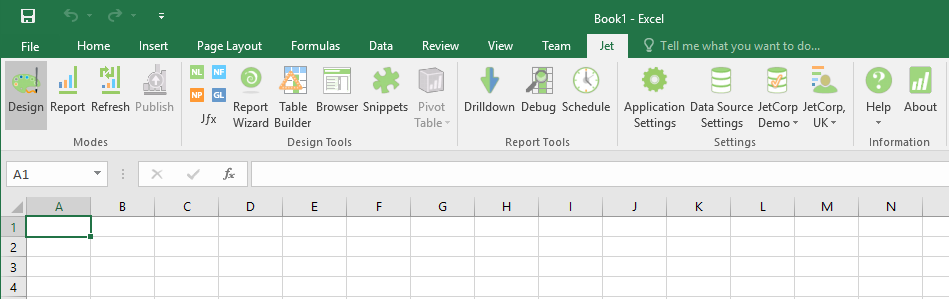
and I click Table Builder, Book2 will be created…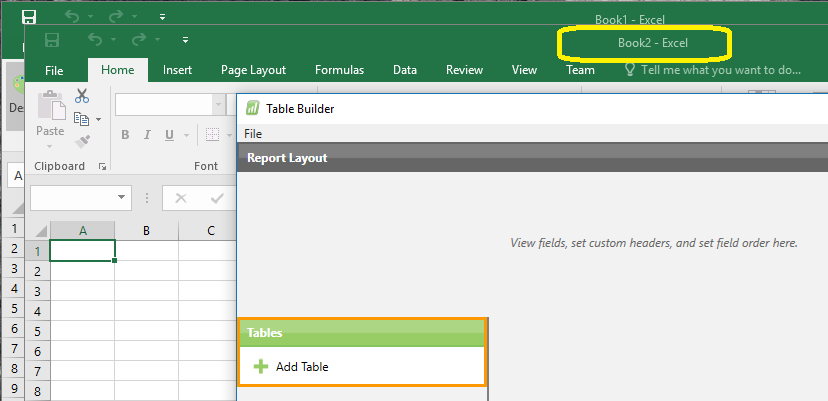
Once I am done defining my table, Table Builder will place the Jet functions in Book2…
What I can do, however, is copy those functions…
and paste them on Sheet1 of Book1…
I can then repeat this process (as many times as needed) - creating new worksheets in Book1 - until I have all the NL(Table) functions I need.
Please sign in to leave a comment.