Hi all,
I have an interesting case here, a user sent me one of their reports - which is using the NL "Sheets" formula to replicate a sheet for each venue they have.
Each time they run this, they get an Excel error message
This workbook contains links to one or more external sources that could be unsafe.
If you trust the links, update them to get the latest data. Otherwise, you can keep working with the data you have.
What I know:
This was a quite a big GL report. I have removed everything apart from options and the bare NL "Sheets" formula, still get the error, so this is an issue with this particular formula.
Upon launch of this report, the link to jetreports.xlam seems to be always broken, and needs reconnecting, every time, even if it is fixed and the document is saved and re-open.
Excel is setup for no security at all, to auto link everything with no question - yet it still complains about links.
Now, the bare report is attached, however without using the native datasource it will not replicate the sheets.
Excel has no active add-ins or expansions, apart from the Jet add-in
Any ideas?
Thanks!
Date
Votes
3 comments
-

Jet Reports Historic Posts Hello -
This is common for Excel to do when opening a workbook which contains external references.
The file has in excess of 100 links to external files.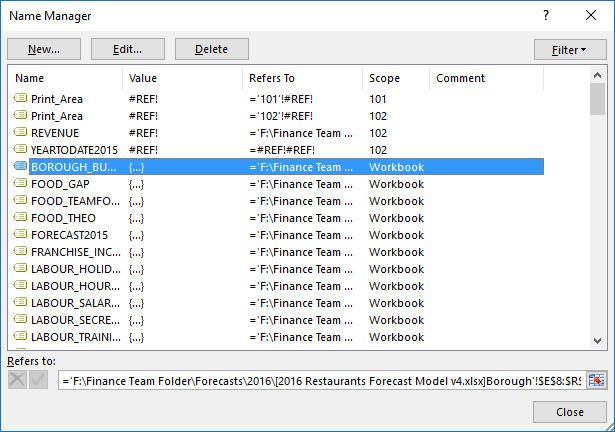
These references (using Named Ranges) may be necessary to the report. If so, I would imagine that they cannot be removed.
Secondly, there are some some hidden sheets present in the file. These are used to store various functions while a report is being run. Under normal conditions, Excel & Jet remove these "backup" sheets when the report is returned to Design mode. The fact that these are still present indicates that something interfered with that process and they may be interfering with the performance of the report.
If you are familiar with how to find these sheets, you can remove them yourself. Otherwise, Jet Reports Technical Support (https://support.jetreports.com) could also accomplish this. -
Jet Reports Historic Posts Hello rspaczkowski,
In this report, click the Excel ribbon > Formulas tab > Name Manager.
In the window that appears, you would see links to multiple external workbooks as shown in the attached image. There is more listed and you can see them by scrolling through the list.
IF these are obsolete links, you can click on each one and use the Delete button to remove the links.
Cheers, -
Jet Reports Historic Posts Thanks, that resolved the problem

Please sign in to leave a comment.