Hi,
I'm new to Jet Reports and I'm trying to add the Customer Name to the existing NAV070 - Sales Orders by Saleperson report. After getting past the inital error of the report looking in the wrong place for the Salesperson Code I am trying to add the Customer Code and Name to the report.
I easily added the Bill-To Customer No. field to the report but I'm now trying to use this field to return the Customer Name from the Customers table using this formula: =NL("First","Customer","Name","No.",$L16). The Bill-To Customer No is in column L. Column M where I have the formula looks blank but when I click on the cell it shows the formula. If I change the formula to include and incorrect field it changes to #VALUE! so I presume I have the formula correct. I was wondering if I need to include the Customers table in the Link section? I have tried to add a link but unsuccessfully.
NAV070 - Sales Orders by Salesperson.xlsx
Date
Votes
6 comments
-

Jet Reports Historic Posts Official comment When you link a table in table builder, it adds "InclusiveLink=" and "IncludeDuplicates=" to the NL Table function, such as it did for Sales Invoice Line:
eg: =NL("Table","Sales Invoice Line",$E$15:$O$15,"Headers=",$E$14:$O$14,"TableName=","SalesInvoiceLine","Filters=",$C$5:$D$6,"InclusiveLink=Sales Invoice Line",$E$13,"IncludeDuplicates=","True")
Note: the function above still needs the link statements to the Customer table.
The easiest way to do this may be just copying the new NL Table function to your existing report as well, being sure that all cell references are intact. When you copy, you also want to make sure that the "TableName=" statement uses the same table name as specified in your old function ("SalesInvoiceLine" from the example above). This is what the Excel pivot table is referencing.
Regards,
krd -
Jet Reports Historic Posts I have downloaded the templates but when I go to open the template for NAV070 I get an error - Invalid Field 'Salesperson Code' - and the template won't open.
This is the same error I got when I first started looking at this report and that it is looking for the Salesperson Code in the Sales Invoice Line table rather than the Sales Invoice Header. -
Jet Reports Historic Posts Referencing the salesperson code from the Sales Invoice Line table does not seem standard. I have modified NAV070 to reference the salesperson code field from the Sales Invoice Header table. I will update the download with this change. I've also updated the Table Builder template to reflect this change. I've attached the updated files for your convenience. Hope these will work better for you.
Note: the Table Builder template is compressed in the .zip file.
Regards,
krdjet -
Jet Reports Historic Posts Thanks for the template krd1996. I was able to use this to link in the customer table and get the customer name. I then tried copy and pasting the Customer link and the field into my existing report but I get the following error:
The field name 'LinkField([Customer],[Name])' is qualified with a table name that is not a link table of the function.
Is it not possible to copy and paste links and fields between reports or is there something else wrong with my report? It was the standard report downloaded from Jet and the only thing that I had changed is the getting the Salesperson Code from the Sales Invoice Header rather than the line, it also took me a while to resolve that issue!
I have attached the latest version of the report. NAV070 - Sales Orders by Salesperson.xlsx -
Jet Reports Historic Posts Hi -
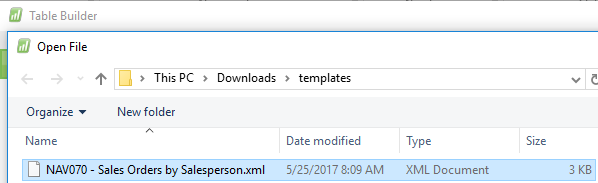
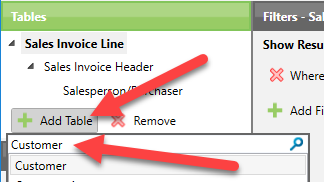
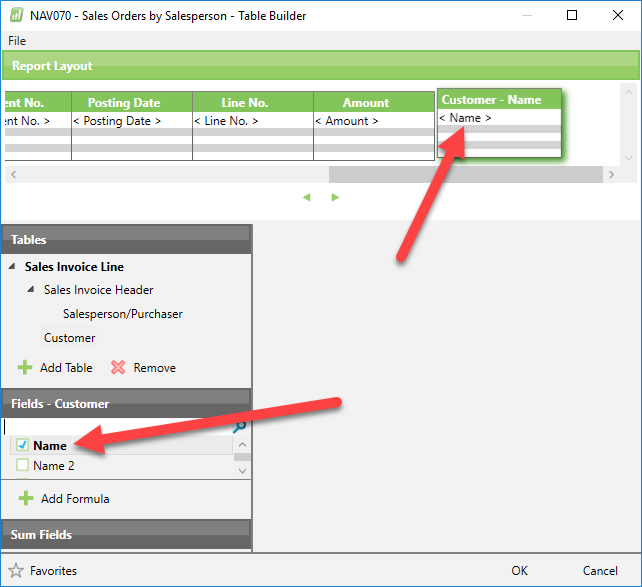
Did you use the Table Builder and the Template (xml) file that KRD provided to make your change?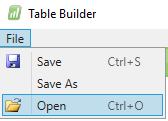

-
Jet Reports Historic Posts Hi krd,
It was the link to the Customer table that was causing the problem. As soon as I added it in the report worked.
Thanks for all your help and HP too!
Regards
Lee
Please sign in to leave a comment.