Hey All…
I'm looking for assistance please with table builder. I have found nothing useful as far as video tutorials. I am creating a report using two different tables from my Microsoft Dynamics GP.
1St table: IV0200 (all columns)
2nd table: POP30330(just the lot serial number is all I am interested.
I first add my main table, IV0200 and select all the columns I wish to appear. How do I add the section I need from the 2nd table?
Thanks in advance for your help.
Wes
Date
Votes
1 comment
-

Jet Reports Historic Posts Hello Wes,
In the Table Builder you select your first table and fields from that table.
Press +Add Table and choose the table to link with in the list.
Then you must specify the link between the tables.
Once a link is specified you can add fields or filters from the secondary table.
Take a look at the attached screenshot for reference.
As far as what field would be utilized to link the tables together this is a matter of knowing the tables and fields in the database and how they relate to one another.
Best regards,
MWilson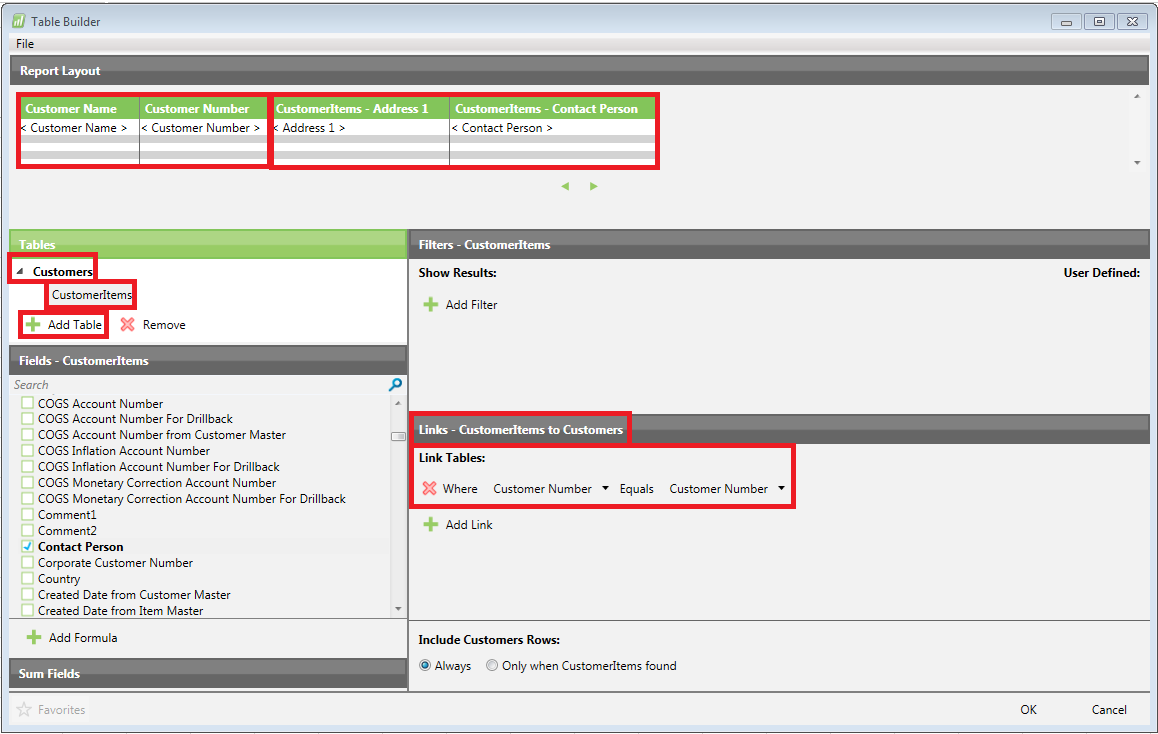
Please sign in to leave a comment.