Hello
I have a report where I have sales by month along the left and then a total for those months
How do I make the report auto sort by the calculated total, this is calculated using the basic =sum(
Date
Votes
5 comments
-

Jet Reports Historic Posts Hi,
The answer to that question can get quite complicated. Are you using NAV? What do your NL(Sum) formula and your NL(Rows) formulas look like?
Regards,
Hughes -
Jet Reports Historic Posts Hello
I have attached the file.
The order column is meant to be blank. When it runs I want it to sort by the TOTAL sales highest to lowest.
Would this be possible? -
Jet Reports Historic Posts Hi Salonsdirect,
In your report I noticed you use NL functions only. This will affect the performance of your report negatively. Also, I'd recommend to have a closer look at the fields in the Item table. This table holds quite a few calculated fields (Flowfields) with quantities and amounts, for sales purchases inventory etc. You may apply flowfilters to these fields. Great fields for calculations and statistics! With this it should be quite easy to create your report.
I've attached a modified version of your report. There is a new part with 1 single NL on the Item table, that should sort the items by total sales for the 6 months period. To the right of it there are some NF functions. Take a closer look at these please to see what happens, and run it to compare it with your report.
As I had no connection to your database I had to enter these functions manually. There could be a typo, but I think you can work from here can't you? -

Byron Au Hi Jet Report Support,
Can we have a sorting for the sub total? We have a field called 'Style' in Item table which 1 Style include multiple items. Now I use a Grouping function to show the Sub
Total for each Style. However there have a requirement that
to sort the 'Sales (LCY)' in Item table with a specific Date Filter. -

Harry Lewis Hi Byron.
I'm not in Jet Reports Support...
(if you have a support issue, you can contact them by submitting a support request)

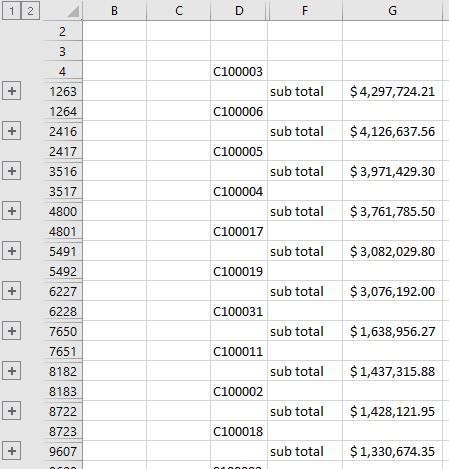
However, are you looking for something like this (where I've created a grouping report that includes a subtotal) ?

By adding the Sort-by-Sum technique to the NL(Rows) function in cell D4:
=NL("Rows=4","Item Ledger Entry","Item no.","-=NL(""Sum"",""Item Ledger Entry"",""Sales Amount (Actual)"",""Item No."",NF(,""Item No.""))","*")My report is sorted by the subtotal:
Please sign in to leave a comment.