Hi all,
I'm trying to return only the first posting date in the Cust. Ledger Entry table for each Customer. So for example, if Customer A has entries on 01/01/14 and 02/01/14, I only want to see the 01/01/14.
I am using this to pull the entries down and set the posting date range:=NL("Rows","Cust. Ledger Entry",,"Posting Date",$E$3,"Limit=",$E$4,"Document Type","Invoice")
Then I am using this to try to get the first posting date entry:=NL("First","Cust. Ledger Entry","Posting Date","Sell-to Customer No.",$D7,"Posting Date",$E$3)
However for a reason I can't work out, I just get the same Customers appearing again and again, where their Cust. Ledger Entries go across multiple days, or they had multiple entries on the same day: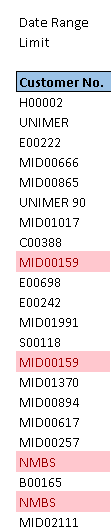
Is there a way I can only show the first time the Customer had an entry into the Cust. Ledger Entry table and ignore the rest?
I've also attached the report in Design mode if it helps!
Many thanks
Steve
Date
Votes
4 comments
-

Jet Reports Historic Posts Official comment Hi,
i would do two steps.
at first:
with =NL("Rows";"Cust. Ledger Entry";"Sell-to Customer No.";"Posting Date";$E$3;"Limit=";$E$4;"Document Type";"Invoice") (maybe in $G5) you can get all "customer No." in the date-range from the table "cust. ledger entry" unique. The result are rows with cust-no, and each cust-no is there just one time, even the customer has more than one ledger entry.
second step would be on (H5) a "NL("First";"Cust. Ledger Entry";"Posting Date";"Sell-to Customer No.";$G5;"Posting Date";$E$3)"….
But, please remember, that "First" is the first datarecord, that Jet will catch, depending on the key (!) and your filters . So be sure to get or set the right key….
regards
jetsetter -
Jet Reports Historic Posts I'm sure there is a way to do that, but it might be pretty complicated.
I choose to use Jet and Excel to accomplish this. See attached.
I inserted a new tab called Table where I did a data dump of every transaction in the Customer Ledger Entry table for that date range and sorted it by ascending date (Very important).[did +hidesheet for this tab]
On the report tab, I used an NL(Rows) to list out all the customer numbers in the Customer Ledger Entry table for that same date range and an NL(First) to get the name.
To find the first posting date, I simply did a VLOOKUP for the customer number and it returns the date associated with the first instance it finds of that customer number.
Since we sorted our Table tab by date, it will always find the oldest date for that specific customer.
If you goal is to only show a list of new customers in a certain date range, there is another way to do that, but I don't think there is a way to then also find the first posting date associated with that customer number.
You create two filters, one listing all customers with posting dates after a certain date and a second filter with customers that have posting dates prior to that date. You then take the difference to leave only customers that had posting dates for this year and take out any customers that had posting dates last year from that list. [see new-customer.xlsx] -
Jet Reports Historic Posts Hi both,
Thank you for your replies! I think both solutions are really useful - Jet BTR, your new report showing the difference between two dates is very helpful for showing new customers created after a certain date. I can also use this for a similar report whereby I want to see customers who haven't had any entries since a certain date (i.e. a lapsed account report)
I think I need both reports to suit what I'm looking for because sometimes we will need the date. I have also used jetsetters suggestion to ensure I only returned unique results.
Thanks again
Steve -
Jet Reports Historic Posts :D
great to hear,
thx for feedback
regards
jetsetter
Please sign in to leave a comment.