Hi Teresa,
Great, thanks.
Did actually not knew that I could replace it with numbers. And it works with only a few second more. :)
Yes, of course. Normally I will put this in a row function with a Limit= filter, or hide the rows and just use an index-match to retreive them.
But this is a part of a huge report, where the approx. 10 columns before and after the Top 10 contains other information that are not similar to how these (top 10 + in total row) has to be, and I would like to avoid a great number of hidden rows.
It could also has been solved by using a pivot placed in a seperate Excel pane, but really wanted to solve it within it's own area.
But again, thank you, your reply worked perfectly.
Date
Votes
2 comments
-

Jet Reports Historic Posts Hi all.
I have an issue, that I hope anyone will be able to help me with.
I need to create a Top X list within a current report, and hopefully without any NL(Rows) function, because the rows and columns of the reports are fixed/static.
I have created the attached reports for testing purposes, and it more or less do the trick, but it is with a NL(Rows) functions (yellow area), which are then being hidden.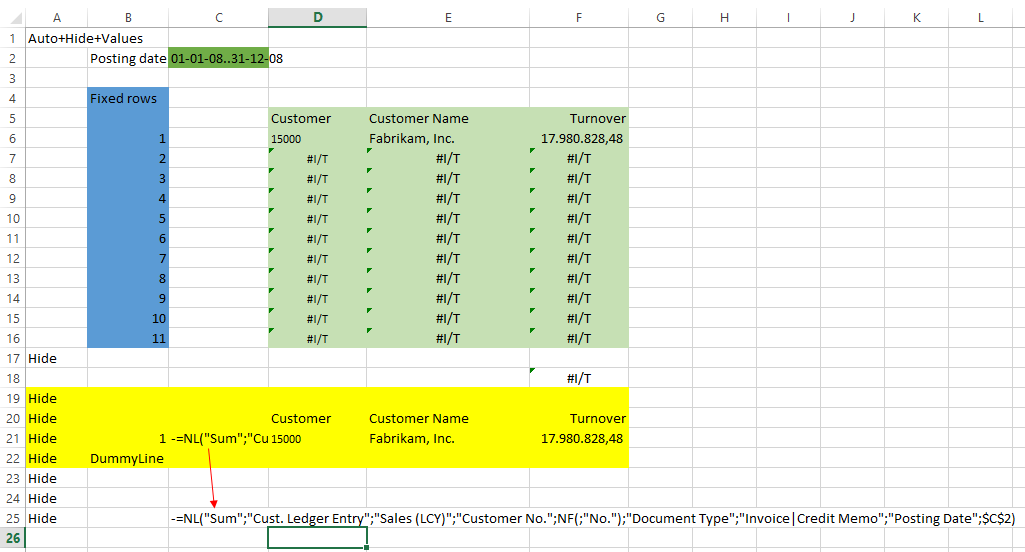
But it would be great to be able, somehow and if possible at all, to be able to return highest value in pre-defined rows.
Like this:
1 No. Name Highiest Turnover
2 No. Name 2. Highiest Turnover
3 No. Name 3. Highiest Turnover
3 No. Name 4. Highiest Turnover
and so on
The result should be like this:
Any ideas input are more than welcome :-)
B.r.
Allan -
Jet Reports Historic Posts Have you tried replace NL("Rows",) with the same formula, but wih NL(1,) to NL(10). Seem to think that migh do the job (although it would be hideously slow.
Do you mind me asking why the rows have to be fixed?
Please sign in to leave a comment.