Hi there,
I'm relatively new at Jet reports so please forgive my terminology if I get it wrong.
I have a report that users need to select the report options from a dropdown list, however users are typing in the options instead of selecting from the dropdown. I need to lock this down so that they are forced to select from the dropdown list (Which works just fine!)
The reason this is a problem is that they are not entering the exact same information as is in the dropdown list.
EG Users are entering "BUDGET 2016" however because the database pads out the field to "BUDGET 2016 " the report returns no values for the budget as the users have not entered the correct details.
Is there any way I can lock this down so that users have to use the dropdown list?
Thanks
Hayley

Date
Votes
3 comments
-

Jet Reports Historic Posts Hello Hayley -
While there is no way to restrict the lookup to not allow user entry, there may be a couple of ways to accomplish the results you are after.
1) You could use report option validation to ensure that the option entered by the user is appropriate for the field. You can find basic information on using this at the end of this Knowledgebase article –> http://kb.jetreports.com/article/AA-00864
2) The other method you could deploy would be to restrict the lookup function to use only valid options. If your list of valid options is relatively short, this method can be very convenient. For example, assume that the user can select a "Period Number" from 1 to 3 … no other options are valid. I could use this function in my Lookup column: =NL("Lookup",{1,2,3},"Select the Period Number")
I hope that helps. -
Jet Reports Historic Posts 1) You could use report option validation to ensure that the option entered by the user is appropriate for the field. You can find basic information on using this at the end of this Knowledgebase article –> http://kb.jetreports.com/article/AA-00864
Hi, thanks so much for getting back to me so quick! With the report validation, I had considered this, only I'd want it to validate against the data within the lookup, if that makes sense. So if the user was to enter the wrong information, then it would look up against the lookup field and return a validation error. Can I do something like =IF(**<>Lookup, False, true), so could I do a NL within that formula or am I getting too excited?
Thanks!
Hayley -
Jet Reports Historic Posts Hi Hayley -
Yes, you can.
Let's suppose that I am looking up a field (No.) in my Customer table, and I only want valid customer numbers to be able to be used.
The function in my could look like this: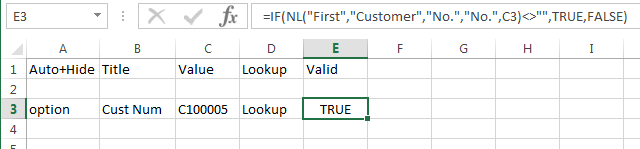
In this way, I can ensure that the filter specified by the user is actually something in my data.
Please sign in to leave a comment.