Hi,
I received this error when trying to use the Purchase Header table in a report. The only field on the report is a basic NL("Rows","Purchase Header"). The full error text is as follows: "The identifier Purchase Header is ambiguous between two or more objects. Please change the duplicate name or caption in your database or specify a unique number, name or caption in your formula".
I have used this table in other reports, although not for a few months, so I'm not sure what has changed. I've Searched and Googled the error but haven't turned up anything. Has anyone else seen this?
Thanks!
Date
Votes
3 comments
-

Jet Reports Historic Posts Official comment Sometimes there can be duplicate names/captions for tables or fields in a database. Most commonly, someone has applied a caption to a table (or field) that is the same as the name of an existing table (or field).
The message is letting you know about this ambiguity so that you can take steps to ensure that you retrieve the actual data you want.
You can either use NAV's tools to find the duplicate information, or you could modify your NL() function to exactly specify the table you want.
Assuming you are wanting to query NAV table #38…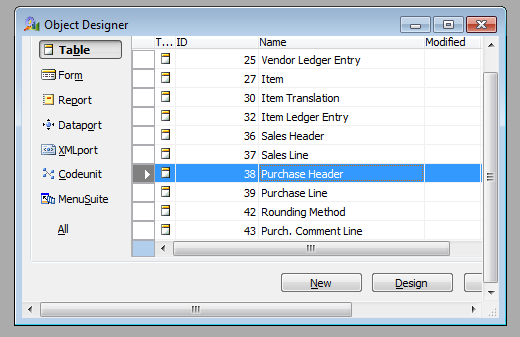
you could change your function to:NL("Rows","38 Purchase Header") -
Jet Reports Historic Posts Changing it to "38 Purchase Header" worked. I'm still not sure why the "ambiguity" is happening, so I'll have to search for that. I would expect that if duplicate captions/names existed, everyone would have this problem, but I seem to be the only one. Thanks so much for the help!
-
Jet Reports Historic Posts Hi
This is due to latest JET Reports version
I too faced the same problem in many reports.
Please see the reply from reports
[quoe]
Hello Chandr,
My assumption is that the user/computer that receives this error is utilizing either Jet Essentials build 15.1.15350.0 or 15.1.15337.0.
Can you verify that this is the case on that user's machine (Jet ribbon > About)?
What is happening is that in previous versions of Jet Essentials if a table or field had the same name or caption as another table or field Jet Essentials would simply pick one of them which could return incorrect information.
In Jet Essentials 2015 Update 1 build 15.1.15337.0 and change was put in place which produces an error telling the user that there is a duplicate, rather than just picking one and running the report.
Release Notes for Jet Essentials 2015 Update 1: http://kb.jetreports.com/article/AA-01104
Jet Essentials 2015 Update 1 Build 15.1.15337.0
December 10, 2015
Changes since 15.1.15308.0:
"Changed Jet to generate an error message when a query is made using an ambiguous table or field identifier. Depending on the data source, this could be the number, name, or caption."
The quickest way to resolve this error would be to add the field number to the "Investment Code" field in both your filters and your fields.
e.g. XX Investment Code
Where "XX" is the field number of the "Investment Code" field.
Best regards,
Matthew S. Wilson
Jet Reports
[unquote]
Best Regards - Ravi
Please sign in to leave a comment.