Hi,
I have two separate Jet Reports that I want to combine into one sheet and sort the results.
Example:
1. Open Orders - Filters and sorts Sales Orders.
2. Open AR - Filters and sorts all open AR.
Column layout is the same in both reports (just from different tables)
Goal - Combine both sets of data into one sheet and re-sort so we can review dollar exposure by Job Name ("Your Reference").
Any help would be greatly appreciated.
Thank you,
Barry
(Jet new-be)
Date
Votes
1 comment
-

Jet Reports Historic Posts Hi Barry -
Depending upon the structure of the source tables, something may be possible.
Let's look at really rudimentary example (and really makes no sense at all expect as an example).
Let's say I have a report that lists the "No." field from both my "Customer" table and my "Item" table:
I then want to see the "Name" and "Description" (respectively) that correspond to those numbers: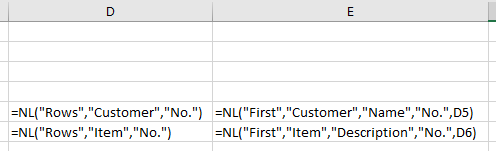
While I cannot make my report *automatically* sort these together, I *can* sort them myself (using Excels sort capabilities) after I've run my report:
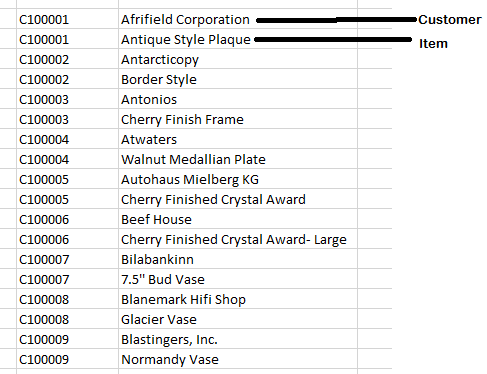
As you can see, I have both my lists combined into a single list sorted by number.
I intentionally chose tables with different information just to show how the lists do, in fact, combine. It would, of course, work if the field names were the same.
I hope that helps.
Please sign in to leave a comment.