Hi
Am struggling with the correct syntax for a formula in the Table Builder. Is a fairly simple IF statement but returns an error at the moment. Think it may simply be a matter of not having the correct brackets/quotation marks etc. Here is what I have so far. Any suggestions?
=NP("Formula","=IF(Value_Entry[@[Item Unit of Measure - Code]]=""9LE"",Value_Entry[@[Invoiced Quantity]]*-Value_Entry[@[Item Unit of Measure - Qty. of Base Unit of Measure per Unit]]),Value_Entry[@[Invoiced Quantity]]")
Cheers
Date
Votes
1 comment
-

Jet Reports Historic Posts Hi.
The formula listed indicates that your table has fields named "Item Unit of Measure - Code" and "Item Unit of Measure - Qty. of Base Unit of Measure per Unit".
Is that correct?
I ask for two reasons:
1 - none of my tables have any such (custom?) field names
2 - If, instead, you have fields named "Item Unit of Measure", "Code", and "Qty. of Base Unit of Measure per Unit" then you are correct in your statement that the brackets need adjusting
Next, since I see "Value_Entry" in your formula, I assume this means that we are dealing with Dynamics NAV and that you are including two NAV tables in Table Builder… one of which is the Value Entry table.
The syntax seems to be a bit off.
For example, for the first part of the formula, instead of this:=NP("Formula","=IF(Value_Entry[@[Item Unit of Measure - Code]]=""9LE""
I would expect it to look more like this:=NP("Formula","if([@[Value_Entry - Base Unit of Measure - Code]]=""9LE""
{again, assuming there is a field named "Base Unit of Measure - Code"}
If you saved and shared the report template and provided a screen shot of the Table Builder as you are working on this, we may have a better idea of what you're up to.
e.g.,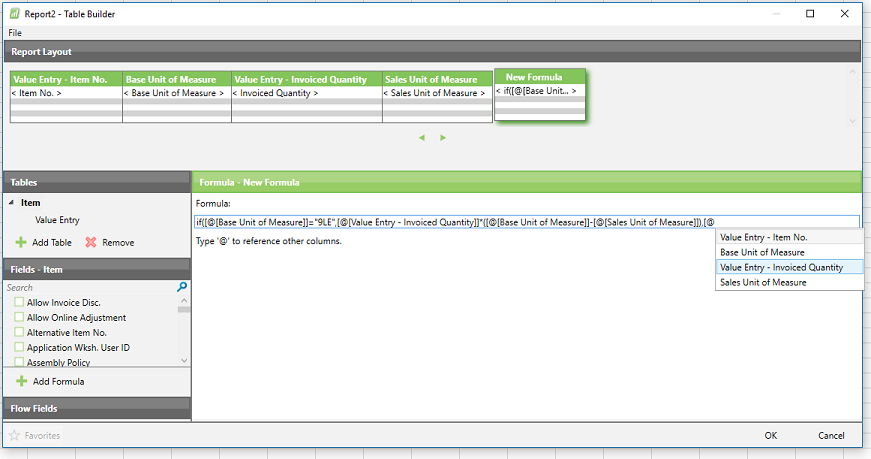
Best,
Please sign in to leave a comment.