Hello,
(First post ever).I am trying to make a Jet filter in an NL query only select values >999. However, in the set it's looking at, some values are strings like 2001-C, 3001-C etc.
Is there a way in the filters for a Jet NL query to tell the filter to only return numeric greater than a certain size?
At the moment on the left side I have: "+DTA_Code_ID"
and on the right I have "3001|4001..4002|4007|5001|5002|5005|5006|6001|6002..7002|8001"
But I'd like to do something like:
Left: VALUE("DTA_Code_ID")
Right: >999
Thanks!
Guy
Date
Votes
2 comments
-

Jet Reports Historic Posts Hello Guy.
From the examples you reference, I assume you are using a Dynamics NAV data source.
When NAV sees that a field contains alpha-numeric data (in any record), it automatically treats that field (for all records) as string data.
As a result, when NAV resolves the query that Jet Professional sends, it will return data based on a string filter rather than a numeric filter.
The only way I know of to get around that is to filter out the non-numeric characters within your filter.
This can get VERY complex very quickly.
To keep it as simple as I possibly can, I'm going to assume that all of your values in that are *not* purely numeric have a dash before the alpha part (e.g., 2001-C, 3001-C).
With that assumption, here is the function I built:=NL("Rows","table_name","field_name","=VALUE(MID(NF(,""field_name""),MIN(SEARCH({0,1,2,3,4,5,6,7,8,9},NF(,""field_name"")&""0123456789"")),FIND({""-""},NF(,""field_name"")&""-"",1)-MIN(SEARCH({0,1,2,3,4,5,6,7,8,9},NF(,""field_name"")&""0123456789""))))","NUMBER&>999")
What this function does is:
1 - find the position of the first numeric value in the field (for the current record): MIN(SEARCH({0,1,2,3,4,5,6,7,8,9},NF(,""field_name"")&""0123456789""))
2 - find the position of the dash: FIND({""-""},NF(,""field_name"")&""-"",1)
3 - using the MID function, build a string starting with the first numeric and going until just short of the dash:
4 - calculate the numeric value of that string
All of this has to be within quotes. Thus, any quotes within those quotes must be doubles.
Finally, I used the NUMBER& to force the filter to look at the 999 as a number
Here's an except of the results I get when I run the function against my sample Cronus data:
When I bump my filter to 9999, I get this: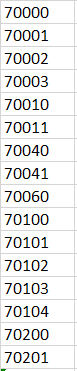
which are all the values in my table greater than 9999
I hope that helps get you pointed in the right direction. -
Jet Reports Historic Posts This is far beyond the level of response I was expecting, I thank you very much.
Looking back, I didn't make it clear, I only wanted numeric values greater than 999 , so not 2000-C etc. But with the analysis you provided I should be able to amend your formula to provide that.
Again, thanks.
Guy
Please sign in to leave a comment.