No matter what I do, I cant seem to maintain formatting of a table when refreshing a Jet Report.
I used the report wizard, modified all my raw data to the cell format I want… then when I put it in a Pivot table it goes back to numbers, instead of dollars?
Any thoughts?
Date
Votes
3 comments
-

Jet Reports Historic Posts Hello -
You'll want to format your pivot table.
For example…
I created an Excel table where my values are listed as currency:
Then I created a pivot table based on that Excel table: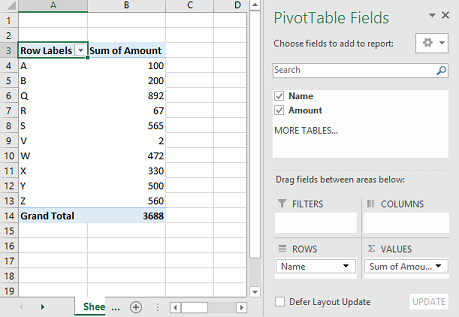
(note that the formatting from the Excel table is *not* reflected).
Next, I click on the sum that is listed in Values section and select Value Field Settings…
Then I click the Number Format button
and select the format I want
This updates the pivot table:
-
Jet Reports Historic Posts What about the ones that aren't in the Values sections?
-
Jet Reports Historic Posts When I place my Amount data in either the Columns or Rows section of the pivot table, the formatting from my table comes through:
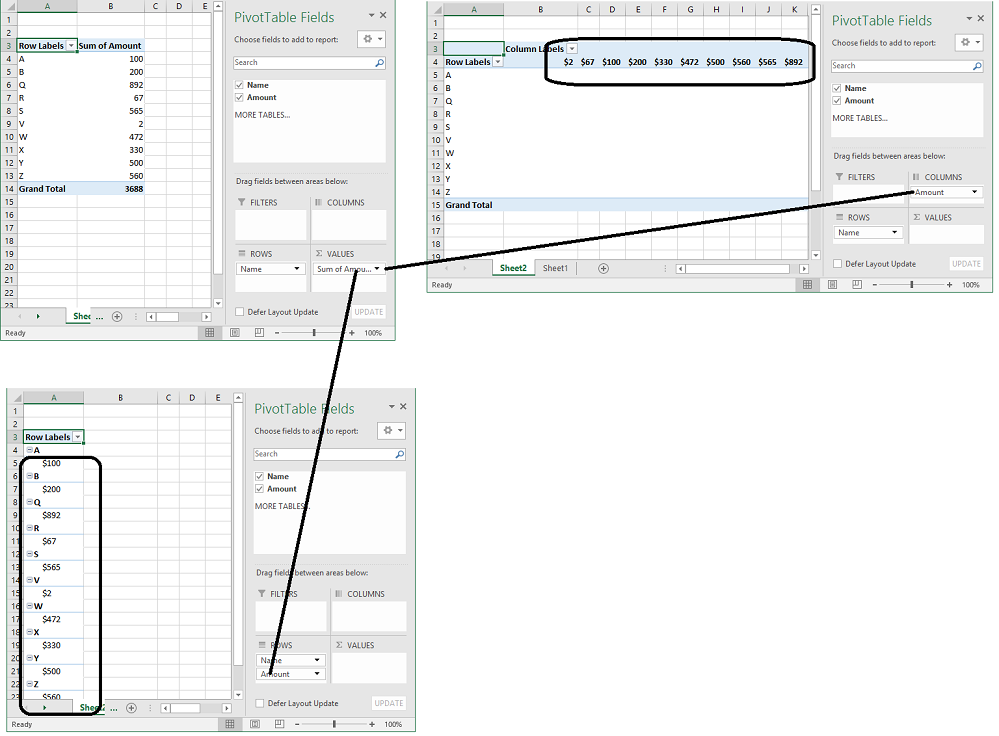
Keep in mind that the NL(Table) function only returns the data from your database, and that data does not contain any such formatting. Once a report is refreshed, new data is brought in and any formatting you applied will be lost.
Please sign in to leave a comment.