I am trying to get the following done.
I have a Payables cube with the dimensions Overdue and Vendor.
And a measure: Remaining Amount LCY
Of course there are more dimensions and measures, but these are used in what I am trying to accomplish :)
When I create a pivot table based on that cube, I can add the measure in the value part of the pivot table, the dimension Overdue in the column part and the vendors in the row part.
So I get 3 columns for each vendor: total not overdue, total overdue and total remaining
In a pivot table you can sort the vendors based on a total column and even on a total of one dimension, meaing I get a list of vendors sorted by the amount overdue instead of the total amount remaining.
So far so good.
Now I want to recreate that pivot table using Jet functions.
My first take on this resulted in this NL function=NL("Rows";"Payables";"[Buy-from Vendor].[Vendor no]";"+[Measures].[Remaining Amount LCY]";"*")
That generates a list of vendors sorted by the total amount remaining.
But I want them sorted by amount overdue, not the total amount.
So I tried this =NL("Rows";"Payables";"[Buy-from Vendor].[Vendor no]";"+NL(""CubeValue"";""Payables"";""[Measures].[Remaining Amount LCY]"";""[Overdue]"";""Overdue"";""[Buy-from Vendor].[Vendor no]"";NF(;""[Buy-from Vendor].[Vendor no]""))";"*")
But that is not accepted by Jet. It says the field 'NL("CubeValue";"Payables";"[Measures].[Remaining Amount LCY]";"[Overdue]";"Overdue";"[Buy-from Vendor].[Vendor no]";NF(;"[Buy-from Vendor].[Vendor no]"))' is not valid.
Is there a way to sort on a dimension value total instead of the general total?
rmw
Date
Votes
2 comments
-

Jet Reports Historic Posts Greetings RMW,
Although I don't have a 'Overdue' dimension or anything similar, I've been able to put together something that sorts on both a Dimension and a Measure value. The trick was to have both layers of sorting contained within the 'Rows' statement, as this is what controls the sort-order presented.
To account for this, I made the 'Rows' statement contain both dimensions desired (in your case, this will be 'Vendor' and 'Overdue'). Notice also that the sort is being applied here, both on the Dimension as well as on the 'Balance'.=NL("Rows","Payables",{"[Buy-from Vendor].[Vendor No]","[Global Dimension 1].[Global Dimension 1 Code]"},"DataSource=","NAV2017 Cubes","+[Global Dimension 1].[Global Dimension 1 Code]","*","+[Measures].[Balance]","*")
With both fields being selected in the Rows statement, I then needed to use an 'NF' to pull out the two dimensions:=NF(D6,"[Buy-from Vendor].[Vendor No]")=NF(D6,"[Global Dimension 1].[Global Dimension 1 Code]")
The image attached shows the sorting being applied to both the Dimension as well as the Balance field.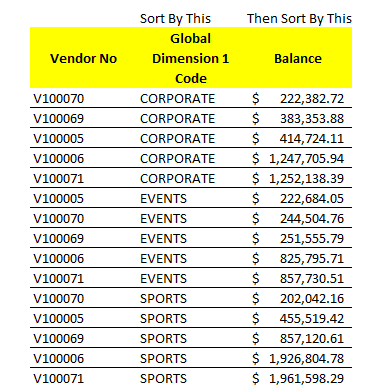
I've attached the sample Excel file to this post. Please let us know if you have any questions. -
Jet Reports Historic Posts Hi RyanP,
Sometimes it is so easy that you overlook it.
You put me on the right track.
This worksNL("Rows";"Payables";"[Buy-from Vendor].[Vendor no]";"-[Overdue]";"*";"+[Measures].[Remaining Amount LCY]";"*")Simply add the dimension to the sorting list.
Your solution to add the dimension to the list of fields isn't even necessary.
In my case it caused the list of vendors to appear double, since I have the dimension in columns.
Thx again!
rmw
Please sign in to leave a comment.