Hello,
please can you give me advice to this error message. When I Run report from Jet web I get in report content this two error message:
1. Field '=SCALARCELL(20,$D$6,NF(22,"Number"),$D$3,EXCELFORMULACELL(24,$D$2,".."&$D$2))' cannot be used as a sort field because the data contained within the field cannot be compared. (Exception ID: 1528c495-dc1b-4fea-a94e-da5f1e6a116c).
This error message go from this NL function: (It is for sorting costumer via Balance - descending)
=NL("Rows";"Customer";"No.";"0";$D$6;"-=NL(""Sum"";""Cust. Ledger Entry"";""Balance (LCY)"";""Prepayment"";""FALSE"";""0"";$D$6;""Customer No."";NF(;""Entry No."");""Document Type"";$D$3;""Filtr dat"";""..""&$D$2)";"*";"Limit=";$D$5)
and 2. Invalid filter "..30.9.2018". (Exception ID: 36073084-8c3d-4105-8cd1-d4192ec039f0).
This error message go from this NL function:
=NL(;"G/L Account";"Net Change";"no.";$I$24;"Filtr dat";".."&$D$2)/1000
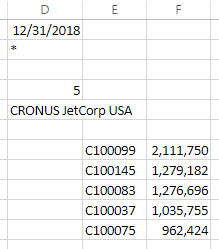
The both report after Run (in excel x Jet web) are folows:
 This error is not only cosmetic. Also I had every time when I open this report (from Jet Web) go thru two error message from excel.
And the last one - Before poblish I must make new format in the cell for "date" in report option, otherwise failed all report content.
We won't this report migrate to the jet Cube but now is still like that.
Thank you for advice