Hi!
I'm quite new to Jet Express so this might be a stupid question… I'm having a problem with the closing date in the following function: GL("Balance";$B68;;"30/09/2013"). As you can see, "Excluding closing date" is false (so it has to be included); the problem is that the closing date is not adding its balance to the final amount. However, using this other formula: GL("Balance";$B68;;"01/10/2013") the closing date is being included correctly (the balance amount for 01/10/2013 is 0, so the final amount is the one I'm looking for).
Could anybody please tell me why is the GL function not including the closing date, if that's something that it should do automatically?
Thank you very much for your help.
Date
Votes
2 comments
-

Jet Reports Historic Posts Hello drubio,
I think the issue is that the closing entries are make on a different date. For instance, 30/09/2013 is a different day than C30/09/2013. I since your function is only looking for entries up to 30/09/2013, the GL() function isn't including the closing entries. Do you get the number you are looking for if you update the End Date parameter to C30/09/2014? -
Jet Reports Historic Posts Hi The Closer,
thanks for you help, but I'm afraid I didn't get any valid result using C30/09/2013. I understand that C30/09/2013 is not the same date as 30/09/2013, but I guess that it should be solved with that option in the GL function, shouldn't it?
I'm attaching two images to clarify the subject. The first one has 30/09/2013 as the closing date and the other has 01/10/2013: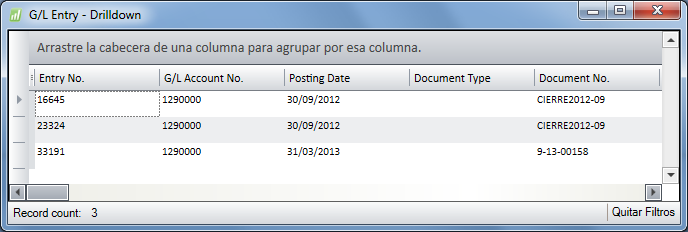
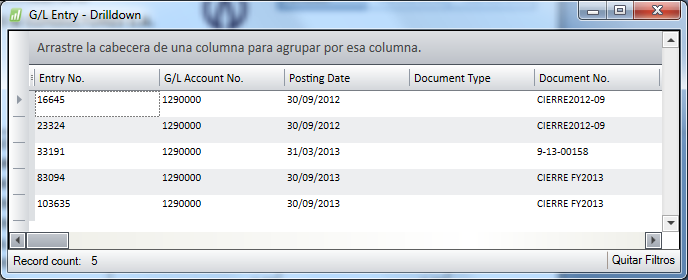
By the way, CIERRE means "Closing date".
Thanks again.
Please sign in to leave a comment.