I cannot find the error in this sheet. It is supposedly in K6, according to the error message. But I have similar reports that are written the same way. Can anyone help me out?
Expected POs.xls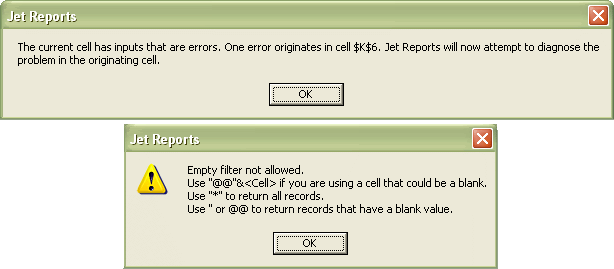
Thanks,
Charmaine
Date
Votes
2 comments
-

Jet Reports Historic Posts The specific problem that you are experiencing is that in cell K6, the values for document type and document number are blank and giving you an error. You can bypass this error by allowing them to be blank. The easiest way to do this is to add to your filter to allow for this. For example, you could add '' (two apostrophizes) before document number, but you would need to surround these in quotes for Excel to understand it. It would look like this:
=NL("Rows","Purchase Line",,"Document Type",$D5,"Document No.","''"&$E5)
Alternatively you can use "@@" as a shortcut for the same, so your statement would look like this:
=NL("Rows","Purchase Line",,"Document Type",$D5,"Document No.","@@"&$E5)
The document type field actually doesn't have a blank, it is quote, order, etc. Quote is the default so you could filter like this:
=NL("Rows","Purchase Line",,"Document Type","Quote"&$D5,"Document No.","''"&$E5)
but the document type is an enumerated value (i.e. a number), so this is the same:
=NL("Rows","Purchase Line",,"Document Type","Quote"&$D5,"Document No.","''"&$E5)
The reason that you are doing any of this is to keep a line from erorring out when it is being filtered for blank. In this case, because no headers were found under the associated filters. There is one other thing that you should probably look at on this report. In cell B5 you have this:
=NL("Rows","Purchase Header"…
But you really want it to replicate not only itself, but the lines below it so that you get header, lines for that header, next header and so on. What you really want there is:
=NL("Rows=2","Purchase Header"… -
Jet Reports Historic Posts Thanks. It is working now! :)
Please sign in to leave a comment.