Hi All,
I have been using a Jet query to return Quantity on Hand for an item category that is not lot-tracked. Up to recently it has worked fine (and still works for other users). However I upgraded from Windows XP & Excel 2010 to a new PC with Windows7 (64-bit), Excel 2010 (32-bit). Now this ONE query refuses to work. I appreciate any advice.
=NL("Rows","Stockkeeping Unit",,"Quantity on Hand","<>0","Location Code",$C$3,"Link=","Item","No.","=Item No.","Item Category Code",$C$2)
This NL function returns all records, then I am using NF jet functions to build a table of data listing location code, item no., quantity on hand, and unit cost.
Again, this still works for other users in my company (both Jet designers and Jet users). I suspect it has more to do with the environment than the jet equation.
Frustrated,
Jeff
NAV 2009 SP1
Jet 9.2.10103.0
Excel 2010 14.0.5125.5000
Date
Votes
7 comments
-

Jet Reports Historic Posts Official comment This won't have anything to do with the operating system, but rather the data source configuration. "Quantity on Hand" is the English caption for the "Inventory" field of the "Stockkeeping Unit" table. Make sure that the language for this data source is set to English, otherwise the tables and fields will be presented with their names rather than language captions. The alternative is to change the report to use Inventory instead, as names will always be recognized regardless of the language settings.
Did that fix it? -
Jet Reports Historic Posts Hi Jeff,
What do you mean that it doesn't work? Is it bringing back the wrong data, or does it not finish calculating? Can you provide any more details? -
Jet Reports Historic Posts For me it returns no rows of data, only #VALUE!
For other users it returns rows of data records with Item No., Location Code, Quantity on Hand, and Unit Cost.
And I wrote the dern thing! You think it would have a little respect… -
Jet Reports Historic Posts How rude! :)
You should be able to find out more information about the #VALUE! error by selecting the cell and clicking the "Debug" ribbon/menu option in Jet. Debug is a handy little tool that can really help in diagnosing problems just like this. What does the error message say?
Regards, -
Jet Reports Historic Posts The error message is "Invalid Field 'Quantity on Hand'." For grins I opened the Function Wizard and opened the Field selection button (where the double comma is in the formula) and there is no 'Quantity on Hand' listed. Then I had my Director of IT do the same thing and his shows that field (see attached). We both have Excel 2010 32-bit. He has Jet 10, but I have Jet 9 (however, it works fine for all other users that have Jet 9). The only other difference in our systems is that he has Windows 7 32-bit, and I have Windows 7 64-bit.
I would think that Jet10 might be required with Win7(64-bit) to enable flow field recognition, but I have other reports that pull from flow fields and they work fine.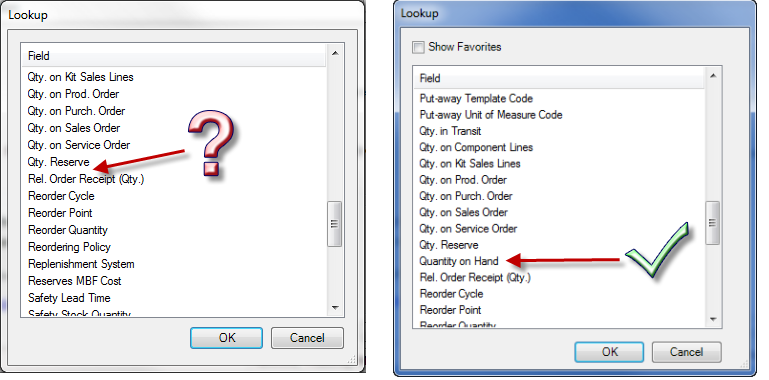
-
Jet Reports Historic Posts Well I'll be…
Mystery solved! Thank you!! -
Jet Reports Historic Posts Glad to help!
Please sign in to leave a comment.