Hi,
I'm pretty new to Jet. I'm aware of the function to produce a 'values only workbook' when user the Scheduler. I was wondering if there is a way of producing a values only workbook when running a report normally i.e. not in scheduler.
Any help on this would be very much appriciated.
Many thanks,
Mark
Date
Votes
8 comments
-

Jet Reports Historic Posts Hi Mark,
No, sorry there is no way to do this. The reason is that once you produce a values only workbook, you can never put it back into design mode or run the report again. The Scheduler produces a new workbook and never overwrites the original, so it is safe to have it output a values only workbook that can never be refreshed again. However, if you allowed users to do that from within Jet, it would be way too easy to destroy all your hard work by running a report as a values only workbook and then saving it and destroying all Jet formulas permanently.
Of course if you need to output a copy of a workbook this way, you can create a scheduled task to do it and then just right-click the task and select Run.
Regards,
Hughes -
Jet Reports Historic Posts Hi Hughes,
Thanks for the reply - makes sense.
Regards,
Mark -
Jet Reports Historic Posts Hi Mark,
I'm no expert on Jet, but I thought that placing the "+Values" keyword in cell A1 achieves what you're after.
When you hit Report/Refresh your Jet formula's will convert to values. When you hit Design they will revert to formula's.
You need to be careful though. If you save & overwrite your original report when NOT in design mode and close the file, you will lose your Jet formula's for good.
Cheers,
Mick -
Jet Reports Historic Posts Hi Mick,
This information is incorrect. If you put +Values in cell A1 of a report and save it in report mode, you can open it again put it back in Design mode and your Jet formulas are not lost. +Values retains the Jet formulas on very hidden worksheets so that when you close and reopen the workbook in report mode, you can still put it back into design mode and the Jet formulas will come back.
Perhaps using +Values will be enough for Mark, although I believe he wants a workbook where the Jet formulas are completely eliminated with no very hidden worksheets or any way of getting them back (like the "Values Only Workbook" option in the Scheduler that he mentioned). This mode is preferable if you want a smaller workbook with no way to re-run the report. You can also choose to delete the hidden columns, rows, and sheets with this mode, which is good if you want to save the workbook into another format such as PDF and don't want hidden rows/columns to appear.
Regards,
Hughes -
Jet Reports Historic Posts Thanks for the clarification Hughes! That seems to work for me now too. Any ideas what I was doing wrong then to lose my formula's?
-
Jet Reports Historic Posts Hmmm, I have no idea! It shouldn't ever be the case that you lose your Jet formulas when running a report and they don't come back when going back into design mode. I suppose there is always that possibility that you accidentally told Excel to break the link with the Jet add-in which will convert all Jet formulas to values with no recourse but that would be something you'd have to do in Excel, not in Jet (you can do this with any Excel add-in). If it ever happens again, you should create a support ticket with Jet Reports.
Regards,
Hughes -

Chris Farmer Why is this not an option on Jet Web Portal?
-

Harry Lewis Hello Chris -
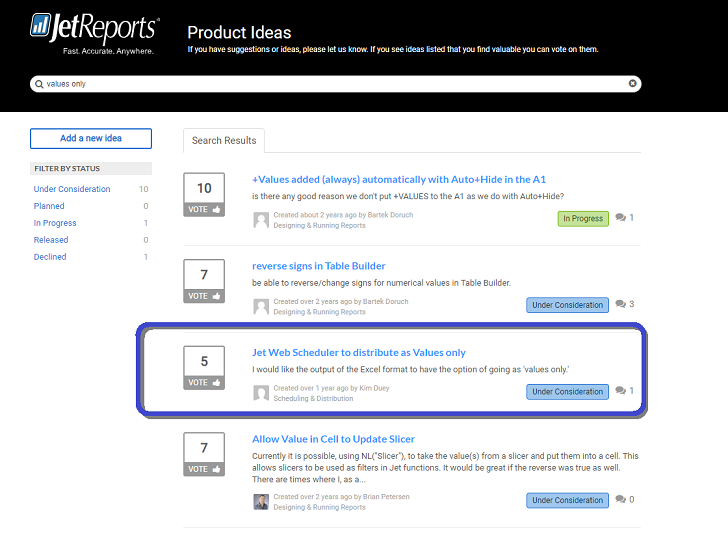
That is one of the top vote-getters currently under consideration for a future release:
Please sign in to leave a comment.