I have a NAV site with multiple companies. Users haver roles set up which restrict their acess to certain companies. They are able to make a database connection and select their company. But when refreshing the report, it returns a VALUE# error. Superusers are able to open and refresh without errors. I suspect that the company-restricted permissions are causing this. How do I overcome it?
Date
Votes
9 comments
-

Jet Reports Historic Posts Hi,
In order to use Jet Reports, users need access to read the Company table for all companies (in other words read access to the Company table with no company set). This is because Jet Reports must get the list of all companies in order to verify the chosen company exists. You can restrict users from reading data from all other tables to just a particular company or set of companies, but users must be able to read the list of all companies in order to use Jet Reports. I suspect this could be the problem you are having. Does this help?
Regards,
Hughes -
Jet Reports Historic Posts I have a question on this same subject. An employee has Jet installed and activated on their computer. But they are no longer a User - profile was deleted - in NAV. If they attempt to refresh a NAV report, they will only be VALUE, correct?
Thanks
Trish
Safari Micro Inc -
Jet Reports Historic Posts Hi Trish,
This is correct. Jet Reports requires you to have a valid login to NAV and respects NAV security. If your user account is deleted from NAV, then you will no longer be able to refresh reports in Jet Reports. Does that answer the question?
Kind regards,
Hughes -
Jet Reports Historic Posts Hi I've got a similar issue,
Once again, my client have got multiple sites, but this time the users log in as windows login, but some of them have got to insert their username and password as not all of them are residing within the same directory. Can they log into JetReports in the same way? -
Jet Reports Historic Posts Hi,
I'm not sure what you mean by usernames and passwords "residing in the same directory". Users should be able to supply the same credentials in Jet to log in that they do in NAV. If the username and password they type in (or don't type in if it's Windows authentication) works in NAV then it should work in Jet.
Regards,
Hughes -
Jet Reports Historic Posts Option to resolve this problem….
We use Window Logon for Dynamics NAV and a Database logon for Jet Reports
The database-user is a 'super-user' so we don't get any problems with restistrictions. -
Jet Reports Historic Posts Hmmm, that may work for a few companies, but I think most companies would balk at letting Jet Reports users have free reign in the database. Your solution means that a Jet user can see basically everything including a lot of sensitive financial information. Potentially if they knew the password for the Jet login they could also log into the NAV client with it and change any data as well.
Really Jet users don't need a lot of permissions at all to be able to use Jet. The one that trips people up most often is that they need read permission on the Company table with no company specified. In other words, they need permissions to view the list of companies. You can still restrict a users' permissions to view the data in any specific company, but they need to be able to see the full list. Another one I've seen (rarely) is that Jet users need read permission on the Object table. I don't think people restrict that very often, so it doesn't usually come up as an issue.
Regards,
Hughes -

Marco Douwes Hi All,
Sorry to kick this topic up, but i`m having the same problem.
I`ve copied the SUPER permission set, renamed it to PLANNER O&O and deleted a few pages and reports and now the user can`t run Jet Reports anymore. It returns below error.
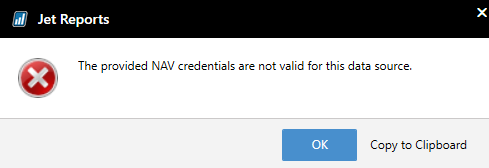
If i copy the super set and only rename it, so no adjustment to the permissions, the user still can`t run Jet.
If i rename the PLANNER O&O permission set to SUPER, then the user can run Jet.
What could cause this problem.
Best regards,
Marco.
-

Tyler Vanblargan For anyone else looking for the solution here - There was a patch in version 20.4.19301.1 where before then Jet wouldn't recognize custom permission sets.
Updating to a newer version should fix the issue.
Please sign in to leave a comment.