First and foremost, I love the NL Table function in the latest version of Jet Essentials. The ability to link multiple tables into one, add excel formula, linksum, linkfield and such has enabled me to create a way-way more useful Account Receivable report than I ever could be with NL Rows. The ability to dynamically change the sorting order and add filters in excel table is, to say the least, magical. So, thank you very much Jet Reports for providing this kind of functionality.
I'm wondering, though, would I be able to format the table the way I could with NL Rows?
For example, for "Amount" column can I format it into currency formatting?
and, I don't like the "Total Row" for Table Style Option, can it be disabled?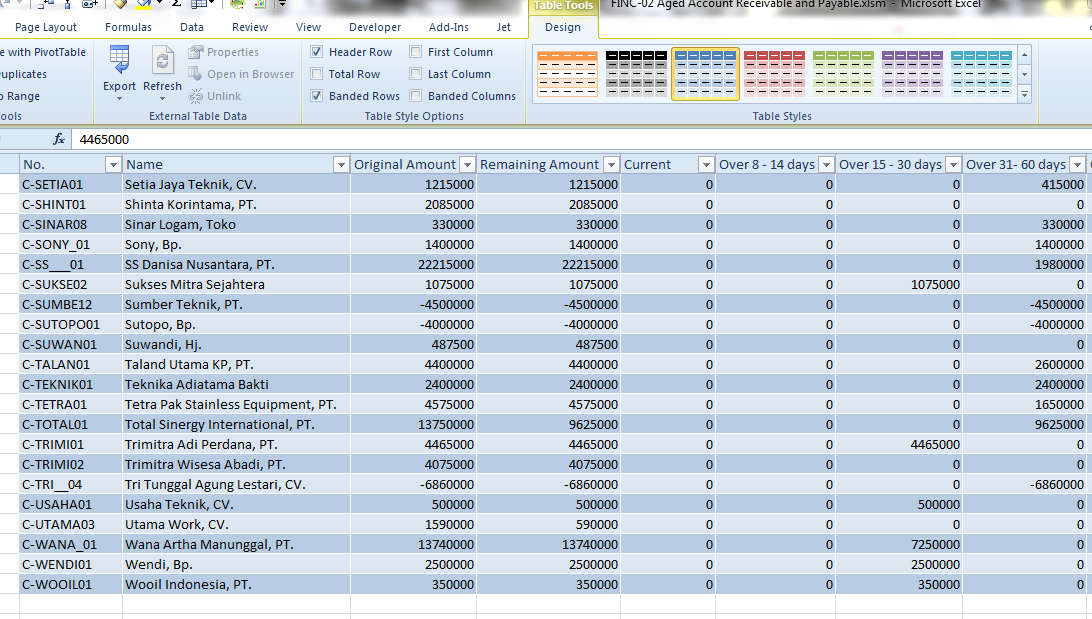
Thank you
Date
Votes
5 comments
-

Jet Reports Historic Posts Official comment Hi Andy,
Thanks for the feedback on the NL table function. I'm glad you like it!
Disable the total row can be done by adding "Hidetotals=","True" to your NL Table query.
We don't have the ability to set the table formatting by column - I've added this idea to our wish list.
Thanks,
Steve
Jet Product Manager -
Jet Reports Historic Posts Thanks for your reply Steve !
Yea the "Hidetotals=","True" works, funny I missed that… :D :oops:
And thank you for considering my suggestion, I'm looking forward for that feature in the future releases
Andy -
Jet Reports Historic Posts Hi,
Did any enhancements take place lately that would allow Jet users to format the cells of a nl/table? Thank you.
Milena -
Jet Reports Historic Posts Hi all,
You can do formatting in the Table builder if you like. One of the things I use it for is 'leading zeroes': http://www.jetxperts.nl/en/blog?m=2012-7&pag=1.
However, changing a field to text may not always be something you want e.g. an amount.
Does this work for what you want to do? -
Jet Reports Historic Posts Thank you, Hans. Unfortunately it did not help. I am trying to convert a number 12345678 to the accounting format $12,345,678. We have a sql database, so table builder wizard does not work. I tried this coding based on your suggestion in the blog page =nl("table","vPI_Award_PUBLIC_",text([@["Total Obligation USD"]];"#,###.0"),"parent No_","A00125") but had no luck.
I am attaching the error message I get. Any other leads? Thank you. Milena

Please sign in to leave a comment.