We have some reports that retrieve data from a few companies base on a customized field called Business Type.
We notice that whenever we add any new company and the Business Type match the JetReport filtering, it should be included in these reports but did not!
Suspecting that the reports are generated using the outdated cache, we have tried clearing the cache to force JetReport to retrieve from the database instead of it's outdated cache, but this did not solve the problem.
We have to manually configure the filter to retrieve from the new company first, so that JetReport "see" the new company, then run these reports again just to get Jetreport to include these new companies.
Anyone else experiencing such weird behaviour? How do you resolve this?
Date
Votes
9 comments
-

Jet Reports Historic Posts Official comment The reason I asked you to run that function was that I wanted to see if all the companies with Real Estate as the Business Type were returned successfully and that their Business Type was Real Estate. You don't need the Business Type in the field parameter in your report, but it was a test to see what a really simple function would return outside of your report. Looks like you are using the Company table, not the Company Information table, so the function should be run against the Company table instead, but I would still like to know the results. In fact, it would be good to run it and see the results and then run it again without the Business Type filter and see the complete results. Then we could compare them and you could point out specifically which companies with a Business Type of Real Estate are not appearing. With a complete report there are more moving parts so it's nice to isolate just what's going wrong.
Regards,
Hughes -
Jet Reports Historic Posts Hi,
Jet does not cache data between reporting sessions. To put this another way, as soon as you close Excel, any data that was cached is gone. So there is no possibility that Jet is caching data unless you keep Excel open the whole time.
So I guess I don't understand exactly what you mean. First, are you using Navision, Great Plains, or some other database? When you say you retrieve data from companies based on a custom field, what does that mean exactly? Does the custom field have the names of companies in it? How does this work?
Regards,
Hughes -
Jet Reports Historic Posts I'm using Navision. See below screen capture where we add business type as an additional field into the company info table.
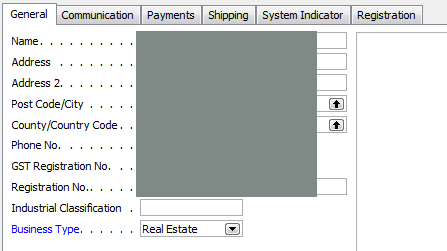
When we put * in business type, it retrieve every company as expected. However, when we put real estate in business type, it retrieve only some companies that has real estate as it's business type, but not all.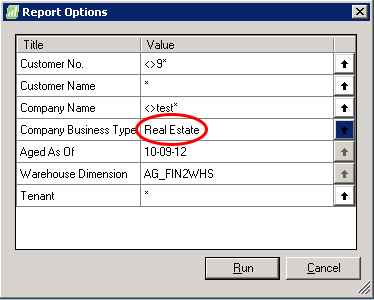
-
Jet Reports Historic Posts Hi,
Okay so I should point out first that your filters <>9* and <>test* will only work if you are using a SQL Server backend database for NAV. This may be the case for you, so they may work, but they won't work under a NAV native server backend. So I want to be sure you know that.
So since this seems to be a problem, let's narrow things down a bit. Create a new empty Excel workbook and enter this formula in:=NL("Rows","Company Information",{"Name","Business Type"},"Business Type","Real Estate")
You can use NF functions to get the Name and Business Type fields from the result of that (or just look at the field cache created since it will have the values in it). Do you see business types listed other than Real Estate?
Regards,
Hughes -
Jet Reports Historic Posts Hi fhiton,
Yes, we are using SQL Server for NAV.
Yes, I see business types listed other than Real Estate.
Is there a need to have business type also input for the table field - {"Name","Business Type"} ?
I do notice that some wildcard filtering do not works in JetReport.
For example, if I filter by company using: M1|M2|M3, all 3 companies will appear in the report.
However, if I filter by company using M*, M2 do not appear at all! Weird isn't it? -
Jet Reports Historic Posts I noticed you use "Company Information" in your report. In standard NAV you can have only 1 record in this table for each Dynamic NAV company that is in the database. All companies within a NAV database are stored in the "Company" table.
Just my 2 cents… I'm not quite sure if this helps, but maybe you can tell us a bit more about the functions you defined in the report? Or even upload the reports in Design mode? -
Jet Reports Historic Posts Attached is my report as you have requested. :roll:
-
Jet Reports Historic Posts All parts work! Except that some of the real estate companies just refuse to get listed unless I put * for business type field or specific put these companies in the filter!
-
Jet Reports Historic Posts Hi Hughes,
You're solved my problem!
Thanks for the reminder that my report was retrieving from the company table instead of the company information table. Somehow, when we updated the business type field in the company information table, it didn't get triggered to also popular to the company table for some companies.
The mystery of the weird jetreport filtering was afterall, the fault of our failed NAV update trigger, not the fault of Jetreport. :oops:
Please sign in to leave a comment.