HI All
Has anyone pulled the information from NAV 2013 Notes into an Excel Spreadsheet. Is it possible?
For example:
Outstanding Customer Ledger Entries. On some transaction lines the Customer has entered notes in the Notes Field which appears on the right RTC screen. I'm guessing it must be stored somewhere in the system as an xhtm or xml file.
Best regards
Chris Seater
Date
Votes
10 comments
-

Jet Reports Historic Posts Hi Chris,
If I get you right, you are looking for table 2000000068 (Record Link) in NAV. -
Jet Reports Historic Posts I'm trying to link this table to the sales orders. How would you do this? The Link ID is not on the sales header table.
-
Jet Reports Historic Posts Please disregard. Found the post with the report attached.
perfect!!
Thank you! -
Jet Reports Historic Posts Hi Chris,
If I get you right, you are looking for table 2000000068 (Record Link) in NAV.
Hi there.
I have tried this but dont get the note attached to the item Card?
Any help? -
Jet Reports Historic Posts Hi -
As Hans noted in his post, that information is stored (as a "blob" field) in the Record Link table.
In NAV 2013, I have added the note "Bicycle note" to my item #1000:
Here is a rudimentary report that lists out my items (number and description) and a note associated with each item:
(if there might be multiple notes, I could build a grouping report [ https://jetsupport.jetreports.com/hc/en-us/articles/218954018-Jet-Essentials-Videos#reports ] and include another NL("Rows") function to list out all the note records associated with each item)
Results: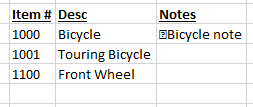
I hope that helps get you pointed in the right direction. -
Jet Reports Historic Posts Hi there.
Would anyone know how to extract the notes from the item bin contents? -
Jet Reports Historic Posts Hello "steps".
How does one get to the screen where those are shown within NAV? -

Marcus Ambra Hi All, I need your support one more time.
I created an report to get information from the Purchase Orders Notes (record Link table).
I want to get the last note of the order, however my report only shows the first note.
Is there any way to get Last Note from Record Link table? You can find below my NL formula.

-

Harry Lewis You might want to try something like this:
The Record ID field will be the same for all records for that item.
For example: I've added three notes to Item #C100001:
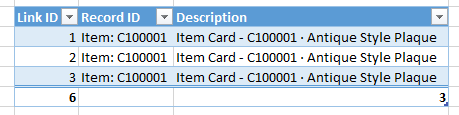
We'll need to use the Link ID field to distinguish our records.
Maybe something like this?
=NL("BinaryText";"Record Link";"Note";"Link ID";NL("Last";"Record Link";"Link ID";"Record ID";"38: 1, "&$G9;"+Link ID";"*")) -
Marcus Ambra Hi Harry,
I did the modification as you suggested and it is working properly.
Thank you so much.
I really appreciate your help.
Please sign in to leave a comment.