Hi all,
At this moment I am working on a report that retreives the turnover for all clients for a number of companies and shows this in a number of pivottables, combined with clientbudgets etc..
This reports takes about 25 minutes to run (this will increase when this year progresses).
This is a formula in my report
=-NL("Sum";"G/L Entry";"Amount";"DataSource=";$F$4;"Company=";$E17;"G/L Account No.";"<>81*&<>83*";"Global Dimension 1 Code";"*";"Gen. Posting Type";"Sale";"System-Created Entry";"False";"Posting Date";NP("DateFilter";DATE(YEAR(Q$14);$O17;1);DATE(YEAR(Q$14);$O17+1;0));"Document No.";NL("Filter";"Cust. Ledger Entry";"Document No.";"DataSource=";$F$4;"Company=";$E17;"Customer No.";"@@"&$G17;"Document Type";"Invoice|Credit Memo";"Posting Date";NP("DateFilter";DATE(YEAR(Q$14);$O17;1);DATE(YEAR(Q$14);$O17+1;0))))
I've read, using "link=" instead of NL(Filter) could possilby increase performance. This is what I tried:
=-NL("Sum";"G/L Entry";"Amount";"DataSource=";$F$4;"Company=";$E17;"G/L Account No.";"<>81*&<>83*";"Global Dimension 1 Code";"*";"Gen. Posting Type";"Sale";"System-Created Entry";"False";"Posting Date";NP("DateFilter";DATE(YEAR(Q$14);$O17;1);DATE(YEAR(Q$14);$O17+1;0));"Link=";"Cust. Ledger Entry";"Document No.";"=Document No.";"DataSource=";$F$4;"Company=";$E17;"Customer No.";"@@"&$G17;"Document Type";"Invoice|Credit Memo";"Posting Date";NP("DateFilter";DATE(YEAR(Q$14);$O17;1);DATE(YEAR(Q$14);$O17+1;0)))
Unfortunately this formula generates a #VALUE-error and when trying to edit the formula in the Funcion-wizard, this error occurs: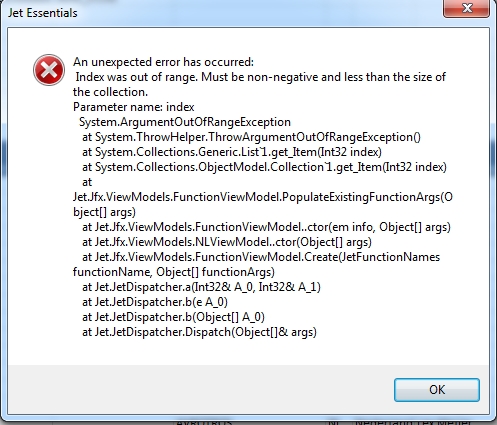
Does anyone know:
- if what I am trying to do makes sense?
- what this error message means and how/if I can solve this issue?
Thanks in advance!
Best regards
Gerard
Date
Votes
2 comments
-

Jet Reports Historic Posts Hi
I am not to sure if I understand the question, but apologies in advance if I am wrong!
The first thing I would do is to move the NP Date function on to the options page or into an array so that they are only calculated once.
When linking to the customer ledgers try using the Detailed Ledgers and the Transaction Number to link this with the G/L Entry
I hope this helps
Malcolm -
Jet Reports Historic Posts Hi Malcolm,
Thanks for your reply and no need to apologize when trying to help!!!
At this moment we have some serious issues with other software. As soon as this has been solved, I will look into this.
Kee you informed!
Best regards,
Gerard
Please sign in to leave a comment.