Hi all,
I am building a report using a NL("Sheets") function which returns data like "#NTB………".
This hashtag at the beginning of the string seems to be a problem. For these values, sheets are created with the initial sheet name + a counter "(2)", "(3)", etc..
Does anyone know if this can be solved without having to change the source-data? Already tried the =SUBSTITUTE()-function outside and inside the NL("Sheets") but this didn't work.
Thanks in advance!!!
Regards,
Gerard
Date
Votes
8 comments
-

Jet Reports Historic Posts Sounds like you need to replicate your sheets using a modifier of the string name
Take a look at these two forum threads - they might get you in the right direction.
http://community.jetreports.com/viewtopic.php?f=7&t=2367&start=0&st=0&sk=t&sd=a&hilit=sheets+name
this talks about adding to the name being returned by the sheets function
http://community.jetreports.com/viewtopic.php?f=7&t=1472&p=4097&hilit=sheets+name#p4097
Similar to the above, but explains it just a bit differently
If I were tackling this, I would create a helper sheet (hidden in final output) to build the replication sheets via a ROWS command
Cell C4 = NL("ROWS","CUSTOMER","NAME","NO.","*")
Then in the next column, I'd do the substitution logic to remove the unwanted hash-tag
Cell D4 = IF(FIND("#",C4)=1,SUBSTITUTE(C4,"#",""),C4)
at the top of the sheet, I'd use a JOIN command to give me the results of the ROWS command as a filter
Cell E2 = NL("JOIN",D4:D5,"|")
to eliminate the extra pipe you'll get at the end of the cell, use a trick in cell F2
Cell F2 = =LEFT(E2,LEN(E2)-1)
Then use the results of cell F2 to build your Sheets command - but don't forget you're going to have to put that hashtag back into the appropriate sheets (to allow your other filters to work properly) -
Jet Reports Historic Posts Hi Heather,
First of all, thanks for your response.
Tried to do it this way, but I can't seem to get the NL("Sheets") to work with the result of the stripped NL("Join"). It gives an error message "Invalid table" + string of the stripped join result.
Also tried the NL("Rows") to create an array and use this in the NL("Sheets"). Also no luck.
As I need this report, I will try some other options. If I succeed, I will post the solution here.
Best regards,
Gerard -
Jet Reports Historic Posts Didn't find a fix to be honest. Found a way to work around this issue.
Created two sheets, both with a sheet-replicator in it:
- First sheet with condition: Description <> "#*"
- Second sheet with condition: Description ="#*" and was able to use the contents of another field for the sheetname.
Regards,
Gerard -
Jet Reports Historic Posts The work around isn't a bad idea.
Regarding the Error message you received with my suggestion - my error was in suggesting the use of JOIN (that's great for creating a report filter, but not so good for the array you need for sheets).
See this suggestion from Hughes, found in another thread.Hi!
Yep, absolutely. So if you enter the values you want for the sheets in cells C3, C4, and C5, you could create an NL(Sheets) function like this:=NL("Sheets",C3:C5)
This would replicate the value from each cell as a separate sheet. Does this work for you?
Regards,
Hughes
Unfortunately, this only helps if you don't need to actually to use a ROWS command for your filter - I forgot that the Jet Reports order of operations is: Sheets, then Columns, then Rows - so your report would be trying to replicate the Sheets command before any rows (even on prior worksheets) are replicated. :(
So, your workaround is likely the best solution for you - and it eliminates the need to build logic to work with the resulting values regardless of hashtag presence. -
Jet Reports Historic Posts Already tried the =SUBSTITUTE()-function outside and inside the NL("Sheets") but this didn't work.
By 'inside', you mean something like this:NL("Sheets";"Table";"=SUBSTITUTE(NF(;""Field"");""#"";""_"")")Replace Table and Field by your table and field
Because that works for me…
rmw -
Jet Reports Historic Posts Hi rmw,
Thanks for your reply!
Tried this again, also to make sure I made no mistakes with all the double quotes…
Unfortunately without results. I still get an error message evaluating the formula:
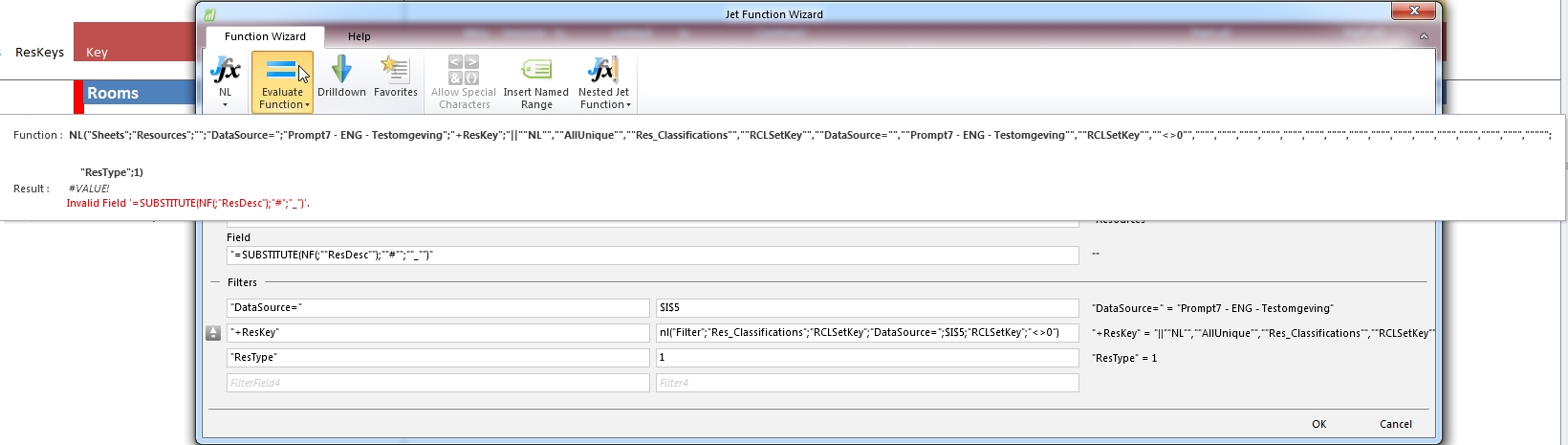
As you might have mentioned, I am using a universal connector to report on a SQL-database (not Dynamics Nav). Perhaps this is not possible?
Regards,
Gerard -
Jet Reports Historic Posts Pitty.
I assumed you use an English version of Excel.
When I tried it on a my Excel version, which is Dutch, I had to use the Dutch name of the Excel function: SUBSTITUEREN
If you use the English version, maybe you should try the English parameter separator and try comma's instead of semi-colons: "=SUBSTITUTE(NF(,""Field""),""#"",""_"")"
Just thinking out loud…it seems a case of trial and error…
I don't know if it works with the universal connector.
Can't find anything about it in the Help.
HTH
rmw -
Jet Reports Historic Posts Hi rmw,
Tested this formula with a Nav2009 datasource and it works perfectly (as expected :-)).
However the same formula (of course with different table and fieldnames) on the Universal datasource fails.
Nevertheless, thanks for trying to help me out!!!
Regards,
Gerard
Please sign in to leave a comment.