Hi all,
I'm struggling with the NP(Difference) formula. Please see the picture below.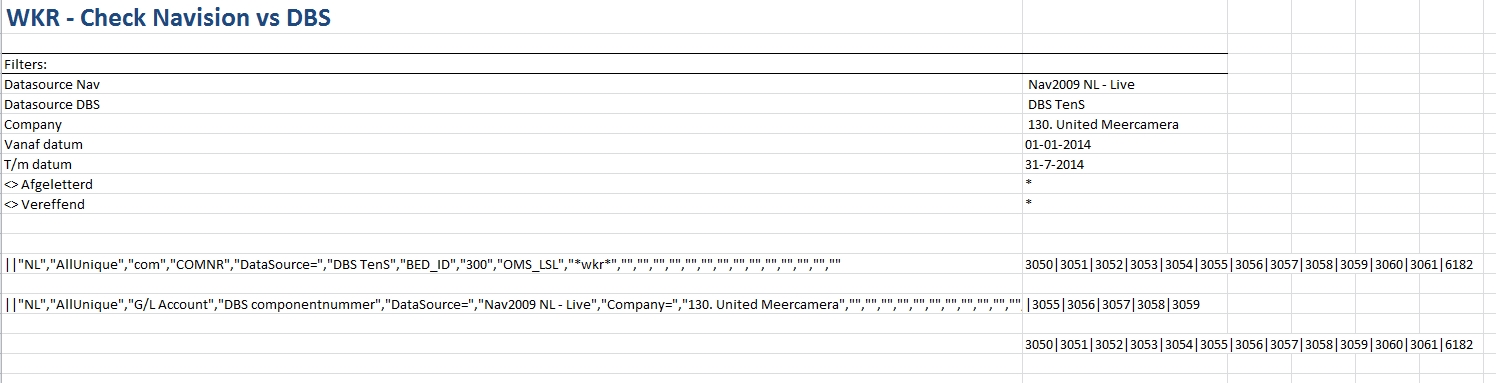
This is not exactly what I will be using in my report but to show what I do not understand:
I have two arrays with data, one starting with 3050|3051… and the other one with 3055|3056…
What I would expect as a result of the NP(Difference) = 3050|3051|3052|3053|3054|3060|3061|6182 and not the result as shown in the excel-file. This looks more like a union.
I must be doing something wrong, but I cant find what. Any help is appreciated!
Regards,
Gerard
Date
Votes
4 comments
-

Jet Reports Historic Posts According to the notes I made during training:
The difference between two arrays consists of all the elements that are in the first array, but are not in the second. - so yes, I would say that this output is not a Difference using that definition
Is there any chance (and please understand I'm taking a shot in the dark here…) that even though the numbers look the same to our eyes, there is something in the output that makes them different? (one output as numbers, the other output as text?) -
Jet Reports Historic Posts Hi Heather,
The problem you are running into is that NP(Difference) is used on arrays. What you have created in cells E15 and E17 are strings (text) not arrays.
Try this:=NP("Join",NP("Difference",D15,D17),"|")in cell E19.
If this works, you won't need E15 or E17. -
Jet Reports Historic Posts Hi JET-btr and Heather,
Thanks for your suggestions.
@JET-btr: I did try this option also (tried it again a few minutes ago, just to be sure), but the result of this formula is the same, sorry.
@Heather: what I tried with the formulas in column E is to eliminate possible differences in 'field type', making them both text.
I really don't understand what causes this behaviour. Going to create a support ticket, perhaps Jet can help.
Thanks again!
Regards,
Gerard -
Jet Reports Historic Posts Gerard,
That is odd as that should work. See my attached fake report.
Sheet1 - Creates a filter with every GL Account Number in the G/L Account table and lists them out (296 account numbers)
Sheet2 - Creates a filter with every GL Account Number in the G/L Entry table and lists them out (101 account numbers)
Sheet3 - Uses the NP("join",NP("Difference",Sheet1!D6,Sheet2!D6),"|") to create a text string of the different of the two (195 account numbers)
As a quick reference, you can see that accounts 11200,11400 and 11500 are listed on both Sheet1 and Sheet2 but are not included in the text of Sheet3 so it is removing account numbers that show up in both arrays.
Perhaps there is more going on with your report or maybe I'm misunderstanding what you are trying to accomplish.
Please sign in to leave a comment.