Hi all,
Im struggling on the following subject. I run Jet Express on a table in NAV 2009 which works pretty well. The only problem is that I can't figure out how to get month and year lables in the pivot where the recordsource is the underlaying express table. In the table there's a column with order dates. I want to create an extra column with the month names in it. Everytime the sheet is updated I have to add a column with a Excel function = Month([Order Date) and an extra column with a Vlookup in another worksheet with the month names in it. With a few pivots to it's not too much trouble, but with 20 pivots to update it's getting a bit anoying.
Is there a way to add the month numbers or better month names in the table, where they get updated everytime the table gets updated?
Or is this something I can only get with the Essential Edition?
Greetings,
Roger
Date
Votes
2 comments
-

Jet Reports Historic Posts I'm afraid I don't know much about jet express, but with jet essentials, if I knew the order date and wanted the month, I'd do something like:
=TEXT(NF(NLReference,"Order Date"),"MMMM") which will return the full month name of that date. MMM will give you the shorter version. -
Jet Reports Historic Posts If you adjust the format of the pivot table itself, the formatting will persist when the report is refreshed.
e.g.,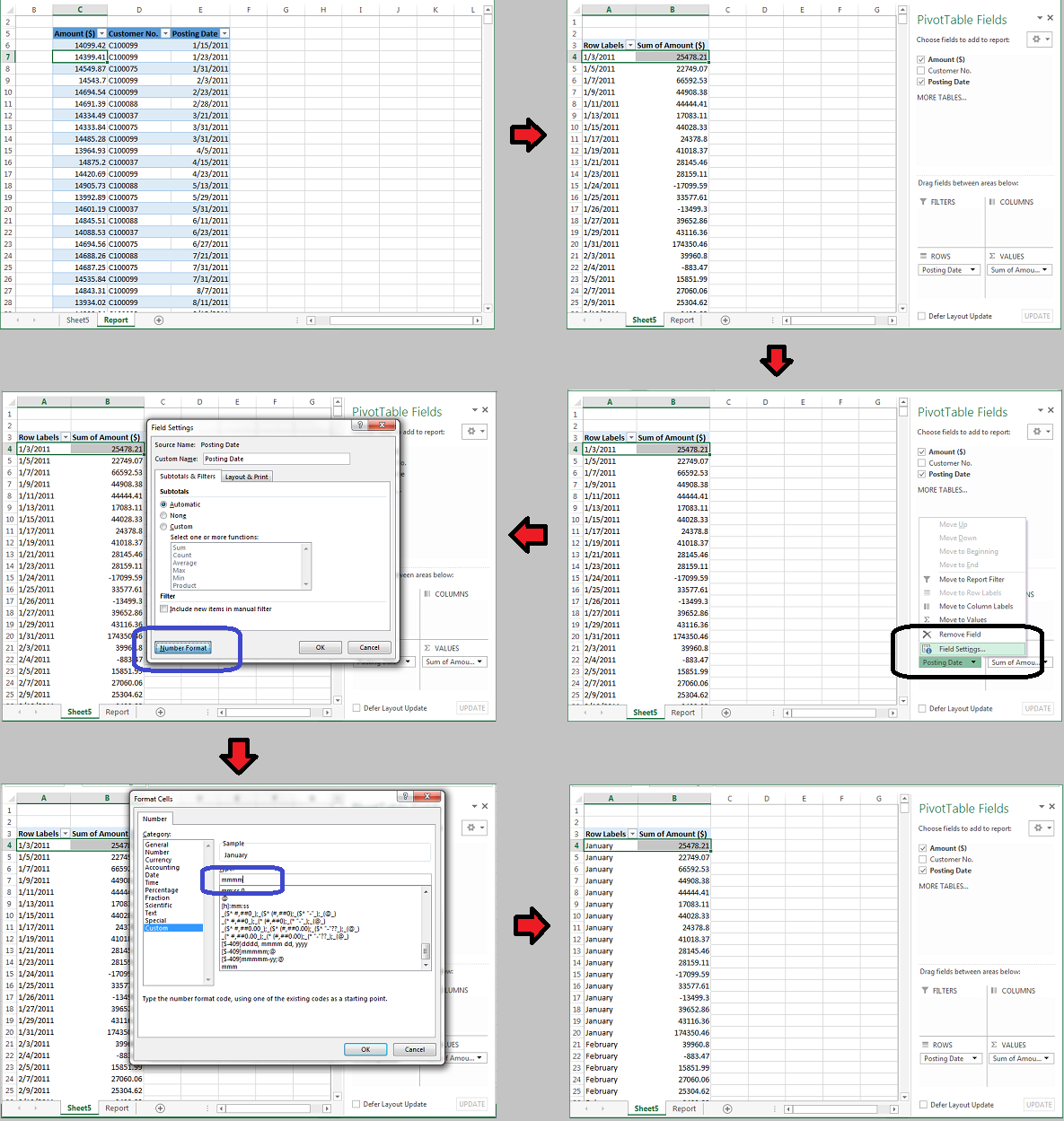
-HP
Please sign in to leave a comment.