I'm sure this one has been solved a dozen times, at least, but I searched under font and display and couldn't find anything. I'm using Jet Essentials 2013 (yes I need to upgrade!) and I've had some queries seem to change where both my column header and some of the data now display in that very light grey font that Jet uses when hidden is selected but you're in design mode. In this case the columns and rows are not marked as hidden, and I've tried everything I can to change the font in those fields. It seemed to happen all at once, and has now happened in a new report I just wrote. Any help you can provide would be appreciated, I need to get a project done and this is the only item remaining. Thanks!
Date
Votes
2 comments
-

Jet Reports Historic Posts While this is not something I have seen before, are you able to resolve it by clearing the formats in your worksheet?
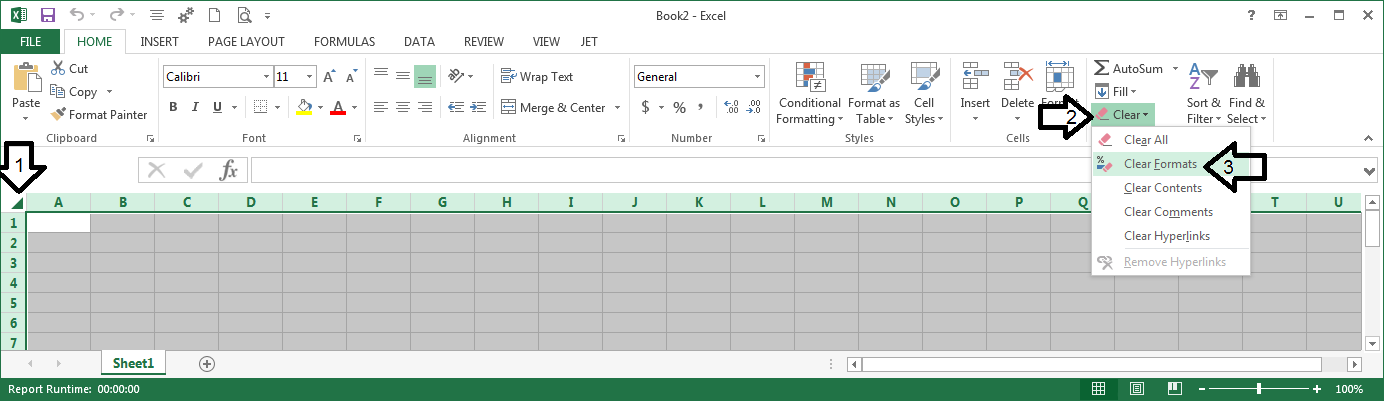
-
Jet Reports Historic Posts That worked! Thanks! I'd tried reformatting it dozens of times, but not clear formats. Thanks for the quick and correct reply!
Please sign in to leave a comment.