I am finding that I can only create 10 filters in the function wizard. Is it possible to increase the limit?
It seems odd…but I need more than 10
=-NL("Sum","Item Ledger Entry","Quantity"
,"Segment Code",$H18
,"Entry Type","Sale"
,"Posting Date",$D$4
,"Source No.",$D$19
,"Global Dimension 1 Code","TC"
,"Quantity","<>0"
,"Sales Amount (Actual)",">0"
,"Link=","Value Entry"
,"Item Ledger Entry No.","=Entry No."
,"Source Posting Group","<>SAMPLE|DONATIONS")
Date
Votes
1 comment
-

Jet Reports Historic Posts Official comment Hello -
On those occasions when you need to employ more than 10 filters in a single NL() function, you can use the "FILTERS=" method.
Here's what that looks like: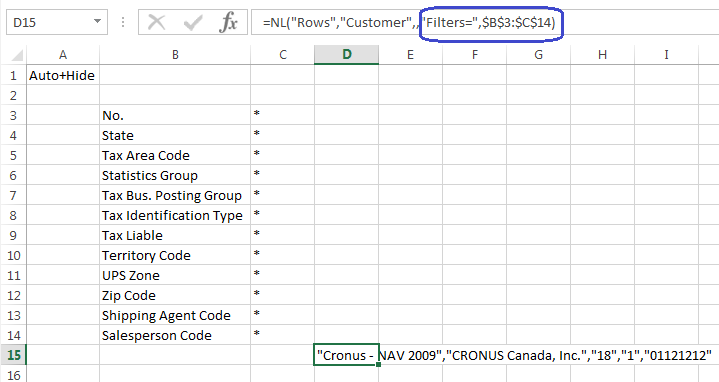
Using two columns, you list your filter fields in the first column and the values for those fields in the second column. You then use "FILTERS=" and reference the two columns in your NL() function.
Please sign in to leave a comment.