We are trying to run a quotes report from NAV but we have several versions of the same quote that share a single quote number.
To minimise the size and time to run the report we have created a Jet Key using the NL function (with Rows). Now were trying to build data using the NF function. However we only want to report on the "last" version number of any given quote number. There is no "Last" element to the NF function that we can see and the report always brings back every instance not the last one.
Any help appreciated.
Date
Votes
4 comments
-

Jet Reports Historic Posts Hi -
Let's look at a simple example for filtering by the last record when multiple records exist…
Here I'm returning records from my "Sales Line" table and showing the document number and line number: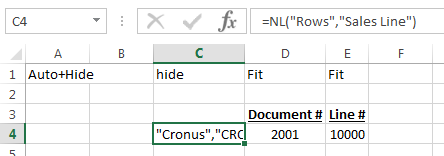
When I run the report, I can see that some documents have multiple lines: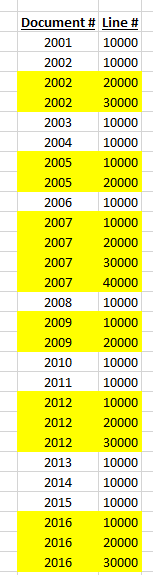
If I add filtering to my original NL("Rows") function, I can state that only the last matching records ("last" meaning the record with the last line number) should be returned:
Then, when I run the report, I see only the records I want.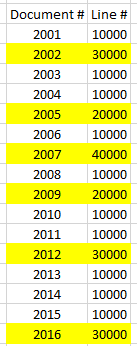
The achieves the same result as having an NL("Rows") and an NL("Last") on separate lines:
without having to hide info we don't want to display.
Make sense? -
Jet Reports Historic Posts Hi HP.
Thanks for that illustration, it's very helpful!
What if you wanted to return only the last line of the last document? If you wanted to return only line 30000 from document 2016 (just the last record), how would you do that? -
Jet Reports Historic Posts We could easily accomplish that with two NL(Last) functions (one to return the last document number and the other to return the last line number of that document number):

Or we can combine the two in a single (albeit slightly more complex) function:=NL("Last","Sales Line","No.","+No.","*","Document No.","=NL(""Last"",""Sales Line"",""Document No."",""+Document No."",""*"")")
which gives us the same results: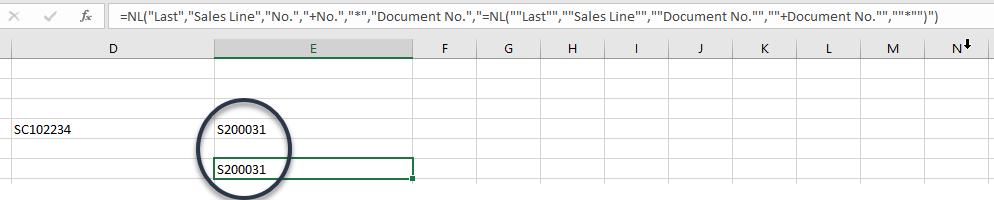
-
Jet Reports Historic Posts Thank you!! :D
Please sign in to leave a comment.