We are trying to locate where and what Jet is calling the Inventory Transaction History Detail "Table" when GP has a real Table called Inventory Transaction Detail History. Notice the different location of the word: History.We're thinking they created some kind of View, but cannot locate it by name. It pulls some normal Fields when we try to use that in a Report, and we need to know where it comes from so we can use it for a Security Role we need to create. Any help is appreciated!!
Date
Votes
4 comments
-

Jet Reports Historic Posts Official comment Thanks.
If you can make a slight change to your data sources settings, you should be able to determine the table you are looking at.
On the Display tab in the Data Source Settings, configure Display Format for either "Physical Name (Friendly Name)" or "Friendly Name (Physical Name)".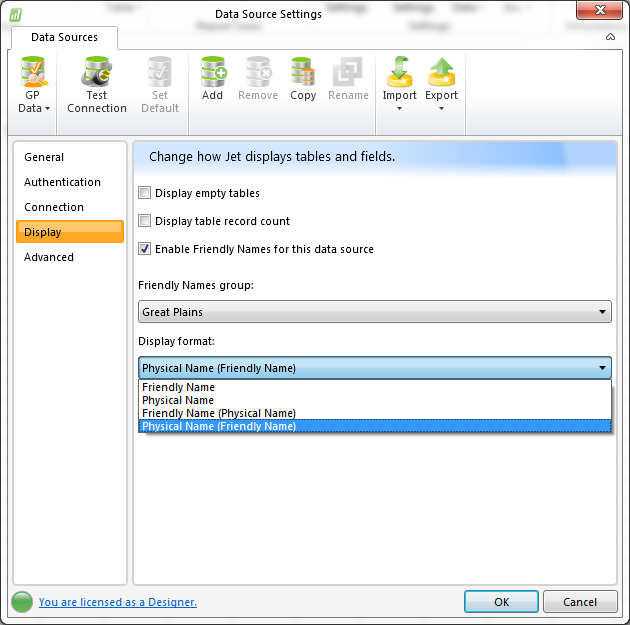
This will allow the Jet Function Wizard to also display the actual table name associated with the Friendly Name you are seeing.
-
Jet Reports Historic Posts Hi -
I'm not familiar with the "table" you mention (Inventory Transaction History Detail). The Friendly Names in my GP database only show "Inventory Transaction Detail History" (IV30301)…
What are the actual names of the tables to which you are referring?
Where did you find a reference to the caption "…History Detail"? -
Jet Reports Historic Posts When one of our Designers is using the Function Wizard, he opens the Table box and can select "Inventory Transaction History Detail" and see all kinds of objects. They are NOT included in the actual GP Table called "Inventory Transaction Detail History." We need to give access to that Jet "Table/View" to another Designer but cannot locate it in SQL.
I cannot seem to cut-and-paste here. I will add to the Attachments. -
Jet Reports Historic Posts That was it! Thank you so much! I still don't know how Jet sees this as that "Name" but I'm glad we can at least track the thing down and correct the Security. Our new Designer is now up and running. Thanks again.
Please sign in to leave a comment.