I have a table that has Day (Monday, Tuesday, Sunday etc), Shift (A,B,NIGHT) and start and end times
When I bring these through as rows, it sorts the days alphabetically, I need to sort by normal day of week order, though of using Excels WEEKDAY formula, but cannot find a way to sort on it
Only some days exist for different shift patterns, so I cannot just hard code Mon - Sun
Any ideas?
Date
Votes
6 comments
-

Jet Reports Historic Posts Right off hand, the only way I can think of would be to list out all the days of the week (in whatever order you want) and use Conditional Hiding to not show those that have no data.
For example:
This data: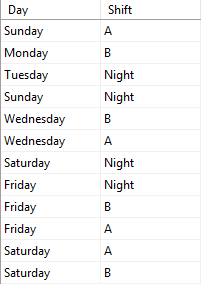
Would give this result: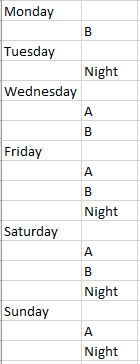
-
Jet Reports Historic Posts Hi,
First a probably unhelpful comment! When I went to test this on my system, the records were already in weekday order with no sorting. Even if I added one for Monday to the bottom, it got resorted and came out correctly with no sorting!
Anyway, to force the sort I created a table on a second tab, with column one having the weekdays and column two having the weekday number eg. Monday 1.
Then I used this as one of the filters in my formula:
"+"&"=VLOOKUP(NF(,""Day""),WeekdayLookup,2,FALSE)","*"
Where WeekdayLookup is the named range for my lookup on the other tab. The whole formula looked like this:
=NL("Rows","Shop Calendar Working Days",,"Shop Calendar Code","7DAY","-"&"=VLOOKUP(NF(,""Day""),WeekdayLookup,2,FALSE)","*")
To confirm it worked I changed the + at the front to a "-" and got the results returned starting with Sunday.
If that's not clear, let me know. -
Jet Reports Historic Posts Thanks Theresa, thats what I am looking for
The date sort will be correct on yours as the calendar has it in order to start with
The table I am working with has an ID field that is not auto-increment, so I can only use alpha based sorting that comes out wrong
The Vlookup will work
Regards -
Jet Reports Historic Posts Spoke too soon, I get a #NAME instead of the key
This is the error when you debug the error
Excel is unable to evaluate '=VLOOKUP(NF(,"Day"),Weekdayrange,2,FALSE)'.
this is the actual cell code
=NL("rows","working hour",,"Production Machine No.","R*","Shift",G14,"Week No.",1,"+"&"=VLOOKUP(NF(,""Day""),weekdayrange,2,FALSE)","*") -
Jet Reports Historic Posts Did you name the range of your lookup to weekdayrange? By highlighting the cells and overtyping the cell reference on the menu bar?
That's the only thing I can think off, off the top of my head. Is it possible for you to attach the file or PM it to me? -
Jet Reports Historic Posts Here is an example of what I am trying to do, I have added a drop of the table on sheet3 for your reference
I can see what it should be doing, but trying to get my head around the extra speechmarks as well
It is probably because the day is not a primary key as such, but multiple days are present so not sure it the NF(,""Day"") will bring it through
Thanks
Steve
Please sign in to leave a comment.