You'll want to do some investigating to find out what is interfering with Outlook.
In the Jet Scheduler, once you have selected "Send email", "Email using Outlook", and provided the email, move on to the next section "Output".
There, turn "Logging" on and specify a path and file name for the log file: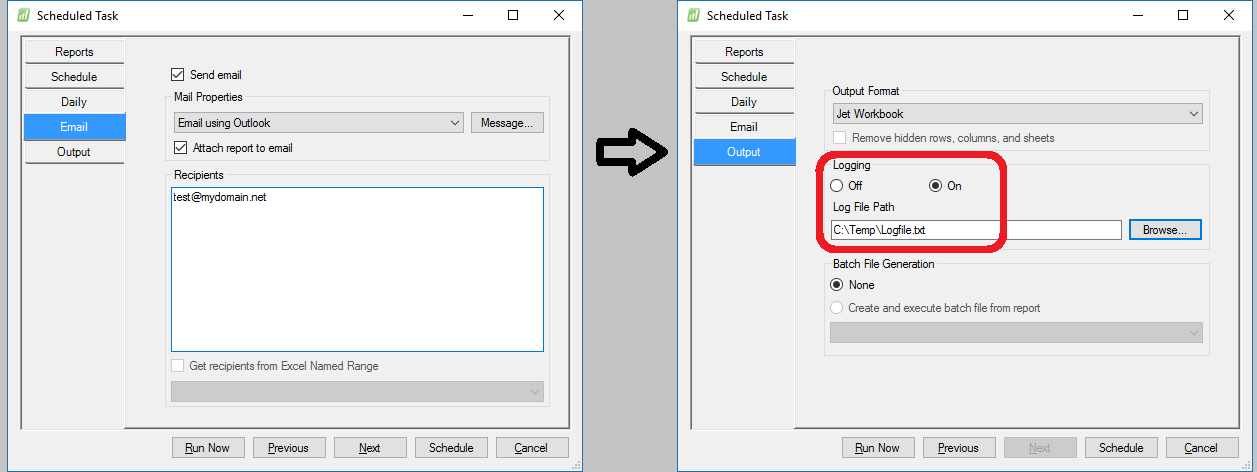
Once your task completes (and you can run it immediately or re-schedule it to run soon - so that you don't have to wait an entire day to find out what's going on), open the log file (using Notepad) and look for any error messages that might shed some light on what issue you are experiencing.
Date
Votes
3 comments
-

Jet Reports Historic Posts Official comment Thanks all - it turns out the smtp server details were not set up in our jet application settings, we have now done this and it has emailed - although there are further issues with my report (see new post)
-
Jet Reports Historic Posts Hi,
So I have created a jet report and now I want to email it at the same time every day to a salesperson.
I've tried using the scheduler and it's not emailing the report. Instead it is saving it to my desktop which is my input and output location.
What am I doing wrong? I've selected the "send email" box and put send with Microsoft outlook and then put in my email address.
The report runs at the time I specified but instead of emailing it it just saves it to my output location
Help! -
Jet Reports Historic Posts Is your Outlook open when the task runs? My experience is that Outlook must be closed. See the below Jet kb for more information:
https://jetsupport.jetreports.com/hc/en-us/articles/218954478-Scheduled-Tasks-do-not-email-when-Outlook-is-open
Regards
Please sign in to leave a comment.