Hello. When using drill down in a Jet report, is it possible to custom select which columns show in the drilldown window? I don't want to show every column in the table.
Date
Votes
3 comments
-

Jet Reports Historic Posts Hello YJury,
Are you using the Jet Data Grid as your drilldown option?
Or are you using the RTC?
If using the Jet Data Grid, in the window that launches when you click on the drilldown button, if you right-click on the field heading, you get the pop-up as shown in the attached image.
From this window, you can deselect any of the columns you do not want to see in the drill down window.
I hope that helps.
Cheers -
Jet Reports Historic Posts If you are drilling down into NAV, NAV administrators can define what Form (NAV 2009R2 and earlier) or Page (NAV 2013 or later) is used for drilldown.
This is done through the properties of a table: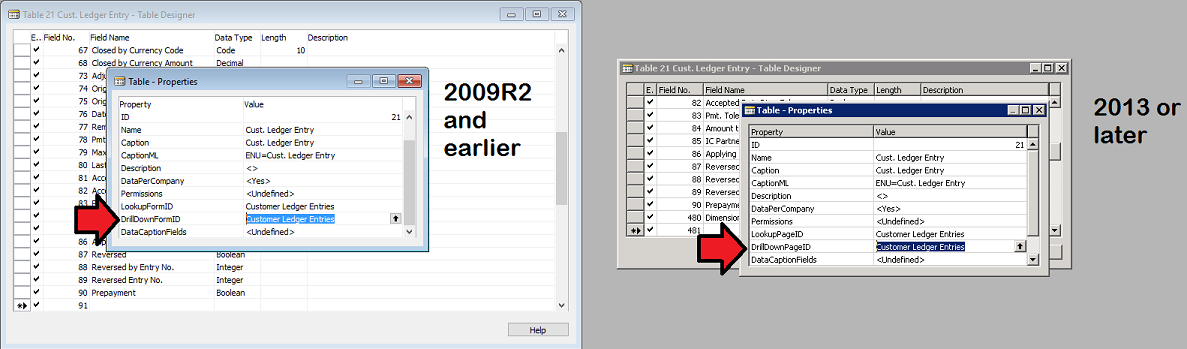
Thus, the NAV admin could define a custom form/page for use with drilldown. -

Louis Liu Hello.
I'm using the Data Grid for drill-down and it seems that my selection of the columns would not stay next time I run the report. All columns show up again.
Is there a specific setting to lock the selected columns and the order of the columns?
Thank you!
Louis

Please sign in to leave a comment.