I have a user experiencing problems with refreshing a bill pay report. No other users appear to have this issue. We have 2 companies set up in Navision, and when the bill pay report is refreshed, the invoices are not separating into proper categories. When I try to consolidate or separate the companies in jet toolbar settings, the 2 company invoices are combined together under the chosen company, instead of being separate.
I've tried different permissions, including super. It still results in the same problems when attempting to refresh the bill pay report. I also tried copying the same permissions for users where this is working properly. Any suggestions or ideas to help are greatly appreciated. Thank you!
Date
Votes
5 comments
-

Jet Reports Historic Posts Background: the issue we're having is that one user tries to refresh the Bill Pay Report Master, and it results invoices that are not in the proper category, and jumbled together under both companies instead of being separated by company. We have 2 companies setup in Navision. Other users are not having this problem. I've copied permissions from users who do not have this problem, but the problem persists. Also tried giving this user super, and the problem still persists. Also tried consolidating the companies, and choosing each one under the toolbar settings, but it's still combining invoices for both companies and invoices are still not in the proper category. Any advice is greatly appreciated. Thanks!
-
Jet Reports Historic Posts Hi -
I have a few questions for you (as points of clarification).
First, what version of NAV are you using?
Next, when you state that "We have 2 companies set up in Navision", when you go in to NAV and select to open a copy, both your companies appear… right?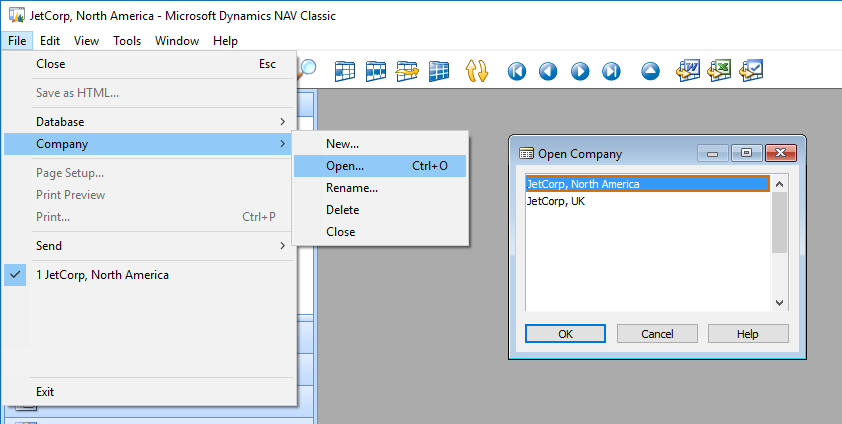
Next, what do you mean by "categories" when you state "the invoices are not separating into proper categories".
Is your single report trying to return information from just one company? or is it trying to do some sort of consolidation?
Thanks. -
Jet Reports Historic Posts Hi -
Thanks for your reply. We're using Nav 4.1 (I know it's discontinued). Both of our companies do appear in Nav. When I say the invoices are not separating into the proper categories, I mean we have columns in Excel for Invoices, Checks, ACH, etc. The report contains info on both companies, but each company should have their own tab/column in Excel. In this user's case, the invoices are either combined from both companies or they'll all be on one or the other's company.
I have a few questions for you (as points of clarification).
First, what version of NAV are you using?
Next, when you state that "We have 2 companies set up in Navision", when you go in to NAV and select to open a copy, both your companies appear… right?
NAV-companies.png
Next, what do you mean by "categories" when you state "the invoices are not separating into proper categories".
Is your single report trying to return information from just one company? or is it trying to do some sort of consolidation?
Thanks. -
Jet Reports Historic Posts Thanks.
In that case, I would check the report to ensure that each function contains the "Company=" filter to ensure that you have full control over which company is being used.
If a report is set to only draw from one company (the default specified on the Jet ribbon) then this is unnecessary. However, if a single report is drawing from multiple NAV companies, you'll want to check that the "Company=" filter is used consistently.
If that does not reveal the issue, you will probably want to share the design of your report with Jet Reports Technical Support. -
Jet Reports Historic Posts Thanks.
In that case, I would check the report to ensure that each function contains the "Company=" filter to ensure that you have full control over which company is being used.
If a report is set to only draw from one company (the default specified on the Jet ribbon) then this is unnecessary. However, if a single report is drawing from multiple NAV companies, you'll want to check that the "Company=" filter is used consistently.
If that does not reveal the issue, you will probably want to share the design of your report with Jet Reports Technical Support.
Thank you very much, I appreciate your advice!
Please sign in to leave a comment.