Is it possible to use an Excel formula around a field name in an NL rows function? What I want to do is get the month of a date only, not the entire date.
I'm trying to do it like this, and it doesn't work. I don't know if the syntax is incorrect or if it's just not possible.
=NL("Rows","Production Order","MONTH(NF(,""starting date""))")
Thanks.
Date
Votes
3 comments
-

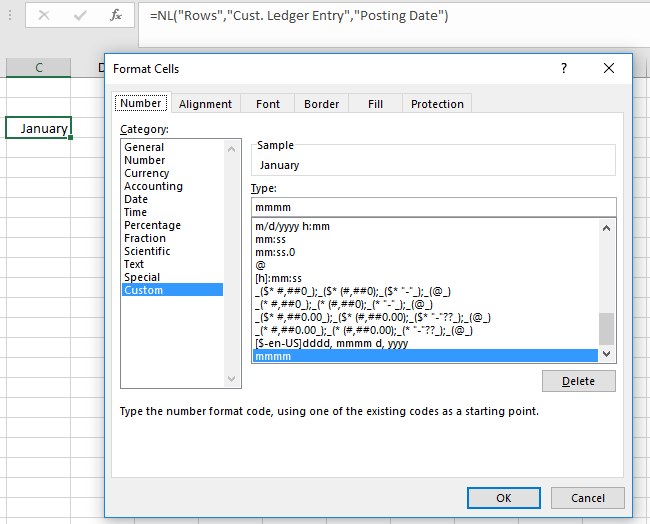
Jet Reports Historic Posts You could just return the date field and format the cell for month name only:
-

Satyanarayana Meka The formatting part is fine but when we want to group records based on this formatting fields it's not working as the key field still contain the Date rather the month values. Is it any other way to perform group by on Month in the below example.
Posting Date
Posting Month Year
GROUPCOA
TERMINAL
Amount
01/06/2017
June 2017
218001
232000
-11745.00
12/06/2017
June 2017
218001
232000
1615.41
13/06/2017
June 2017
218001
232000
-11780.00
26/06/2017
June 2017
218001
232000
14784.10
-

Gabriele Hayden These two posts suggest two different methods for grouping by date using NL Rows:
https://jetsupport.jetreports.com/hc/en-us/community/posts/115008522848-Group-by-calculated-column-
https://jetsupport.jetreports.com/hc/en-us/community/posts/115008499488-Grouping-by-date
And this one suggests how to group by date using a Pivot Table:
https://jetsupport.jetreports.com/hc/en-us/community/posts/115008492968--need-to-group-the-records
Best,
Gabriele
Please sign in to leave a comment.