Good morning…
I'm trying to do a Replicator with an array inside Excel using NL("Rows=3",$A$1:$A$6)
The issue I'm running into is that instead of doing A1, blank, blank, A2, etc…It actually does A1, blank, blank, A4, etc.
Has anyone run into this issue and is there a way to make it work properly?
Date
Votes
3 comments
-

Jet Reports Historic Posts By using ROWS=3, you are telling Jet to replicate the next three rows each time the replicator runs.
Normally this is used because you are nesting other data into those other two rows.
Example: I have a sheet that I want to show Customer Name on the first row, on the second row I want credit information, and on the third row I want invoice information.
I would write a command like: NL("ROWS=3","CUSTOMER",,"NO.",$C$4) C4 would be where I have my filter information for the customer or customers I want to pull in
the next row would have formulas to pull in credit total, and the third row would have formulas to pull in invoices total
my output would look like:
CUSTOMER A
Customer A Credit Total
Customer A Invoice Total
CUSTOMER B
Customer B Credit Total
Customer B Invoice Total
if you don't want the blank lines in your output, you need to change the ROWS command from ROWS=3 to ROWS -

Harry Lewis I tried to duplicate the issue you described, but was not able to.
Here's the simplistic report I created:
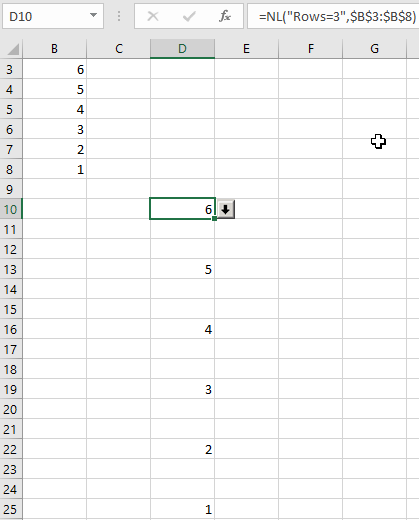
(I avoided using column A since that column and Row 1 are reserved for Jet keywords).
Do you get different results is you apply this example?
-

Heather Rowe Yes, that is exactly the behavior I expect from ROWS=3, if we assume from your example that the 6 in your report was connected to data in rows 11 & 12, then the standard way to handle that would be to copy down the 6 into those rows, so you could use it in your formulas. Like this:
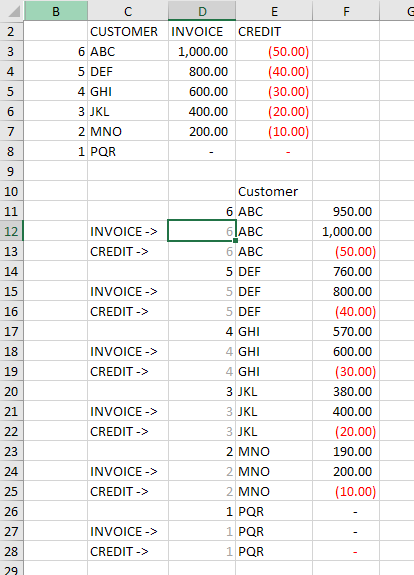
(edited to correct image)
Please sign in to leave a comment.