What are the permissions differences between the user account under which the error occurs and the user account under which you are able to schedule tasks?
Date
Votes
3 comments
-

Jet Reports Historic Posts Hi all
Hoping someone could help.
When trying to start jet scheduler I get a Jet Scheduler has stopped working message.
Problem signature:
Problem Event Name: CLR20r3
Problem Signature 01: jet.scheduler.exe
Problem Signature 02: 14.1.14226.0
Problem Signature 03: 53ed0960
Problem Signature 04: System.Xml
Problem Signature 05: 4.0.30319.34234
Problem Signature 06: 53cf1d82
Problem Signature 07: 985
Problem Signature 08: 27
Problem Signature 09: IOIBMURHYNRXKW0ZXKYRVFN0BOYYUFOW
OS Version: 6.1.7601.2.1.0.256.48
Locale ID: 3081
Additional Information 1: 0a9e
Additional Information 2: 0a9e372d3b4ad19135b953a78882e789
Additional Information 3: 0a9e
Additional Information 4: 0a9e372d3b4ad19135b953a78882e789
Manually running reports seem to work just fine, however I am not able to run Scheduler.
I can see the Tasks in Task Scheduler and they seem to run fine within Task Scheduler. I am not however able to create new Scheduled Jobs. -
Jet Reports Historic Posts I spoke with a support technician about this.
According to the information that Windows 7 is reporting, something is interfering with MS Office's ability to communicate with the Windows Task Scheduler.
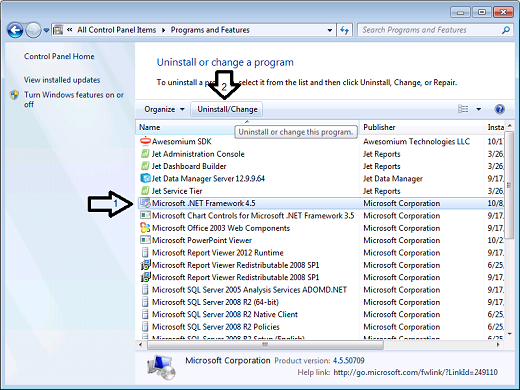
The nature of the error indicates that you may want to perform a Repair on both the installation of Office and the installation of Microsoft's .NET Framework.
-
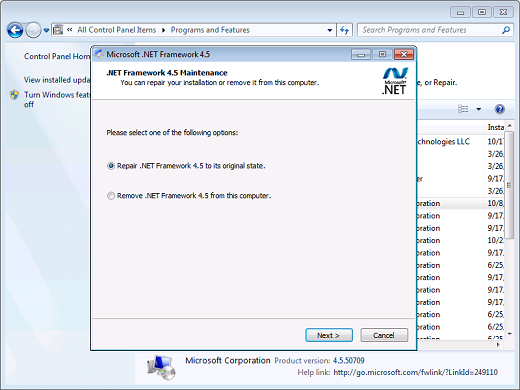
-
Jet Reports Historic Posts Hi HPDeskJet
I followed your recommendations to repair Office and .Net Framework. To be safe I also uninstalled and reinstalled Jet Reports. Unfortunately I am still receiving the same error.
Thank you for your recommendations though. Much appreciated.
On a hunch, I tried to log into the computer under a different user account. Under an alternate user account I was able to access the Jet Reports Schedule.
Please sign in to leave a comment.