Hi Community,
I'm designing a report with a simple optionsheet. However the option pop-up is not showing for non-designers. Anyone have an idea as to what may be the problem? I have attached a screenshot of my optionsheet. In my reportsheet I'm referencing to field $C$3 (the value field for that option).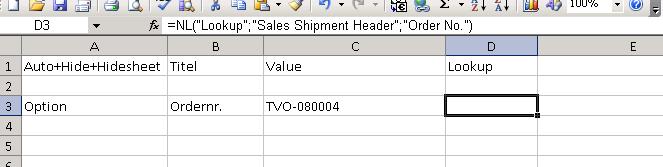
Date
Votes
6 comments
-

Jet Reports Historic Posts Hi WSBReports,
What do you mean exactly with "Option pop-up is not showing"? Do you mean the user does not see the defined option at all? Or is the Lookup arrow greyed out for this field?
P.S. Cell B1 says "Titel" - shouldn't this be "Title"? -
Jet Reports Historic Posts What do you mean exactly with "Option pop-up is not showing"? Do you mean the user does not see the defined option at all? Or is the Lookup arrow greyed out for this field?
There is no pop-up at all for people without designer rights, for people with designer rights there is a pop-up.P.S. Cell B1 says "Titel" - shouldn't this be "Title"?
It's from a Dutch report, Title = Titel in dutch. I translated the sheet to english so it be easier to understand, guess I missed one. -
Jet Reports Historic Posts Silly me, I should have noticed this one straight away (In Dutch I would say "Dom dom, had ik gelijk moeten zien ;) )
If you add +Values to Cell A1 you should have your options sheet for viewers too.
Hmmmm… it would be good if the Jet Reports Development Team would add a warning if you forget to add +Values to your Options worksheet. Like the kind of warning when you forget to add +Lock or +Values to a Report worksheet. -
Jet Reports Historic Posts I used the 'Introducing Report Options with Database Lookup' section from the knowledgebase for reference which doesn't mention +Values either.
It did the trick btw, thanks for the reply. -
Jet Reports Historic Posts Hi,
I just tested this using 7.1.2.1820 and I get this message
Which is the correct error message. -
Jet Reports Historic Posts Hi Sherman,
You are absolutely right.
I checked the little report I created last night to see what I did… When you create a report:
- with an Option worksheet
- without any Jet function (e.g. NL(Lookup)) on the Option worksheet
- and do not add +Values in Cell A1 on the Options worksheet
and then activate "Simulate viewer mode" and run the report, you will get no error message nor an option sheet.
But when you add a Jet function, you will get the error message you show us.
So, now I wonder why WSBreports didn't get an error message, as he/she defined an NL(Lookup). Maybe WSBreports can tell us more? :?:
But there's more to this… when you activate "Simulate viewer mode" and run the report the option sheet doesn't show up the first time!
When you press Report again… you will have your option sheet :) Jet Reports added +Values to Cell A1 automatically.
So I guess we don't a warning after all ;)
Please sign in to leave a comment.