Hi All,
First of all, I must congratulate all posters for making this a tremendous resource - I'll get nothing done at all this week, as I'm going to enjoy some "research" time.
I'm building a simple sales report for my internal stakeholders and would like Jet to replace the formulas with values. I've added Auto+Hide+Values to cell A1, but once the report has calculated, I'm still left with the formulas visible behind the values.
Any thoughts?
jonesy
Theatre Royal (Plymouth) Ltd
Date
Votes
6 comments
-

Jet Reports Historic Posts Hi Jonesy,
Auto+Hide+Values should do the trick. One thing to keep in mind is that it will only replace Jet Reports formulas with values, while all Excel formulas will stay intact. The way that this happens is that after the report is run, Excel's "Break Links" command is called to break the link to the Jet Reports add-in. We have seen in some cases where this command will fail.
I would make sure you're using the latest version of Jet Reports. If the problem persists, you should log a support case on the Jet Reports support site (http://support.jetreports.com).
Regards, -
Jet Reports Historic Posts This is a really old post, but it is what came up when I searched for "break links", so here I am.
I need to know if there is a way to have Jet replace excel formulas (not just the Jet formulas) with values when a report is run. I'm using AutoPilot to run batches of reports, and I think I could get the file size down and significantly reduce my runtime if I could link from workbook to workbook for some of the values. But every time a user opens one of the reports with external links in it, they get an error regarding external links not updating. So is there some code I can add somewhere that will remove all formulas and save everything as a value at the time the report is finished running and ready to email?
Thanks in advance for any help with this! -
Jet Reports Historic Posts Hi -
Since Excel does not have the ability to save a 'values only' workbook, it is not possible to accomplish this in a Jet Essentials report.
The option the Excel makes available is to open your workbook (in this case, the report in "Report Mode"), copy the entire page, open a new workbook, right-click in the new workbook and select the "Values" paste option.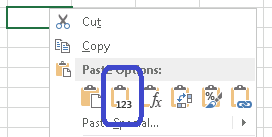
That does, however, sound like a great feature that could be kept in mind for a future update! -
Jet Reports Historic Posts I was afraid that might be the case, but it never hurts to ask! Thanks so much for your help.
-
Jet Reports Historic Posts Add
*NL(,NP("Integers",1,1))to formulas that result in numbers and&NP("Eval","=""""")to formulas that result in text and they will convert to values after running the report.
rmw -
Jet Reports Historic Posts Hi.
The scheduler allows you to save a doc with values only. If you open the Jet scheduler and select Values Only as the output then it should work. There is also an option to remove all the hidden rows.
From the KB page: http://kb.jetreports.com/article/AA-00654/0/How-to-Use-the-Jet-Essentials-Scheduler.html
"Values Only Workbook: This will save the report as an Excel file with all Jet Reports functions removed. The recipient would not be able to refresh the report as it will be a static Excel file"
Please sign in to leave a comment.