Hi,
is there a way to set the format during the refresh.
E.G. : I have a function that creates a excel table with NL("Table"). Inside the function is a dimension field. Unfortunally the Code is 000255 and so on. But Excel cuts the leading zeros. Is there a way to get the original data?
Thx in advance
Oliver
Date
Votes
4 comments
-

Jet Reports Historic Posts Official comment Hi all,
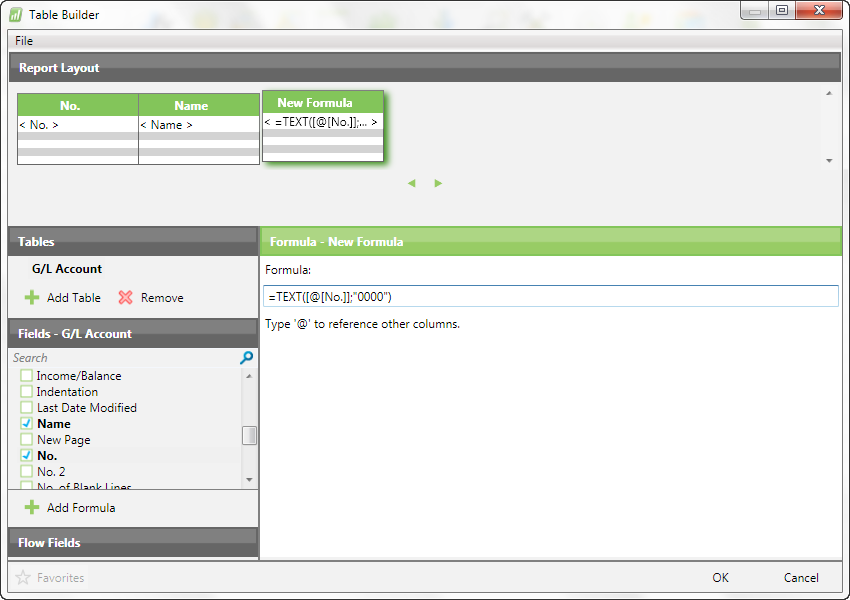
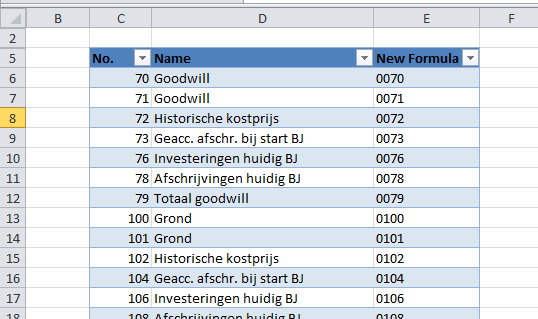
I was thinking… if the Code field has a fixed length of 6 characters… then maybe we could use a TEXT function in a Formula. So, I tried the idea on my Cronus database. Instead of a dimension field I used the G/L Account No to test the idea. Although it works, I agree with Hughes to see if this could be fixed in a different way.
Here are 2 pictures to show what I did:
- select the table and the fields from the table
- add a formula with TEXT for the No. field that holds leading zero. The No. field is 4 digits.
- the end result in an Excel table so that you can see the end result
]
What do you think of this, Oliver? Would this a work around that works for you? -
Jet Reports Historic Posts Hi Oliver,
I played around with the problem a bit and I'm not sure there is currently a way to do this other than to use NL(Rows) instead of NL(Table). I will log an issue for this so that it can be fixed in a future build of Jet. Thanks for helping us improve Jet!
Regards,
Hughes -
Jet Reports Historic Posts Hi Hans,
That definitely works as long as all the numbers are of the same length. I would still like to get this fixed on a more general purpose basis so that it will work even if the account numbers are of different lengths. Thanks for the suggestion.
Regards,
Hughes -
Jet Reports Historic Posts Hi Hans and Hughes,
thanks for your replies. Hans thank you for your hint, this works fine for me!
With kind regards
Oliver
Please sign in to leave a comment.