Hi all.
We're having some trouble configuring a NAV 2013 Data Source. From the pdf published on support.jetreports.com, the following instructions are given, along with the steps required for the RTC:
"Microsoft Dynamics NAV 2013 includes a "Jet Data Source" codeunit which must be published to enable Jet Essentials or Jet Express to operate. This can be published using the Role Tailored Client (RTC)."
However - I cannot find this codeunit in NAV 2013. It simply is not in the Object Designer at all. The screenshot attached shows the error we are getting when attempting to publish this in the RTC. 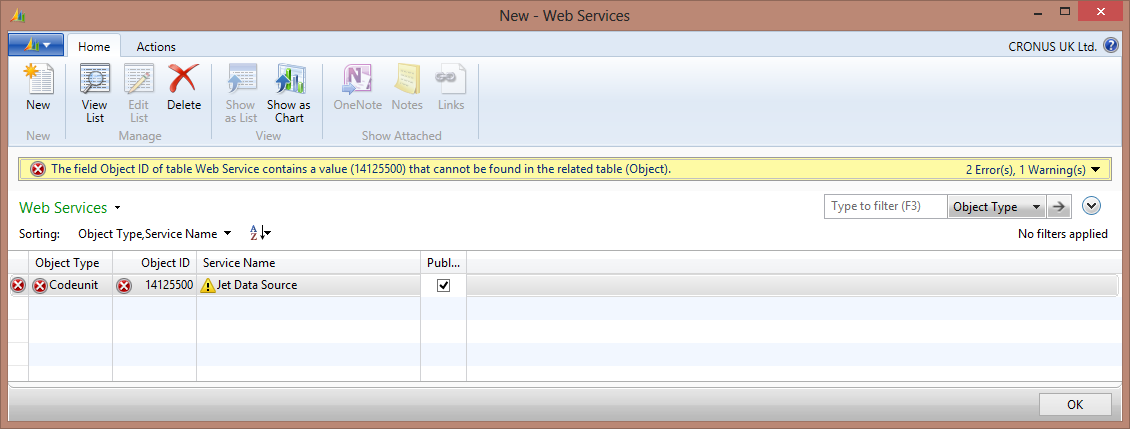
Has anyone else had this problem? Thanks :)
Date
Votes
5 comments
-

Jet Reports Historic Posts Official comment Yes I believe Microsoft dropped the ball here, both on the licensing and the codeunit inclusion. The codeunits should be included out of the box and all new NAV licenses should have the Jet granule, but this is not currently happening. We are working with Microsoft to resolve the issue, so hopefully it will be corrected in the future.
Regards,
Hughes -
Jet Reports Historic Posts Hi,
It kind of looks like you're trying to publish a codeunit to the web service that doesn't exist. Attached are the Jet codeunit objects. Import these into NAV and that should resolve this issue. You may get a warning when importing about the COUNTAPPROX function being deprecated. This is just a warning and can be safely ignored. Does this help?
Regards,
Hughes -
Jet Reports Historic Posts Hi Hughes,
Thank you for this, it does help and you are right, the codeunits did not exist. This error is now resolved.
We were just confused since the JetReports installation instructions stated that NAV 2013 comes included with these codeunits - perhaps they were removed before release of NAV 2013. Do they need including in the JetReports release instead?
Anyway, we are now just missing the Jet granule from our 2013 license and have raised a support ticket and will hopefully get our license updated. There was no option to specify the JetReports Granule (or in fact any ISV granules) when creating the 2013 license through VOICE but I think this is a Microsoft issue rather than a JetReports issue. -
Jet Reports Historic Posts I downloaded the objects attached to the posts here as it was the only place I could locate them. When I try and configure my Jet data connection I get the following error -
The revision number of the codeunit is not compatible.
This version of Jet is comptaible wiht codeunit version 12.5, revision 8 and later.
Where can I obtain the correct FOB? -
Jet Reports Historic Posts You can download the correct fob along with the latest version of Jet Essentials here:
http://jetreports.com/download/
Regards,
Hughes
Please sign in to leave a comment.