I have a report that when ran, results in the error below, this error only happens in one division (we have about 7) and in one particular tab of the report (there are about 6 tabs per excel workbook)
I have read afew posts on here that using the "LINK(" formula would reduce the memory usage of the report, but being a very new Jet Reports user, i am having trouble figuring it out. I have attached the report, using Cronus USA.
My questions are
1. On the attached workbook, would link help reduce the memory the report uses.
2. How would i go about using the "LINK"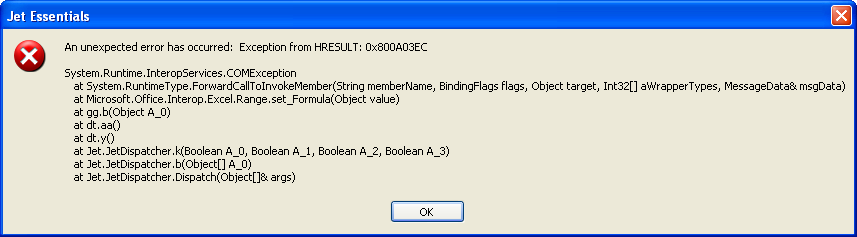
Date
Votes
5 comments
-

Jet Reports Historic Posts Hi,
I doubt it's going to help since you only have a single NL(Filter) function on this report, but I have converted it to an NL(Link) and attach the result.
Another thing you could try if you're having memory problems is using the Jet Scheduler to schedule the report and on the Output tab choose "Values Only Workbook" and "Remove hidden rows, columns, and sheets". The file output by the Scheduler in this case will not be able to be re-run because all Jet formulas and hidden elements will be completely removed. However, this may fix the memory problem. Does this help?
Regards,
Hughes -
Jet Reports Historic Posts Thank again Hughes for your help.
In regards to the NL(Link, it did not work, but at least i learnt the basics of it. so That was OK.
As for running the report in Scheduler, The problem still persists i guess since there is no file saved after i run the report.
I tried running it again and there seems to be a weird issue i came across, the report runs file all thru, but there is one line that has an error in it, not sure why. Every other tab, and line is fine on the report. When i try to save the report, Excel crashes.
I did post a ticket see below
"Hello Donald -
The error indicates Excel does not have sufficient memory to complete all the processes involved in completing the report.
Specifically, the report includes +VALUES in cell A1 (e.g., AUTO+HIDE+VALUES). It is when performing the actions involved with using +VALUES that Excel is running out of memory.
You can trying removing any +VALUES from the A1 cells in the report and re-test. This would decrease the amount of memory required by Excel and may allow the report to complete." -
Jet Reports Historic Posts Hey guys,
Been prompted to look through the forums to see what others are working on.
In your formulae, you are using NL("Date Filter",…,…) several times. This is (a) incorrect syntax, and (b) very memory/processor hungry.
It's always a good idea that if you are using a date multiple times, particularly in replicators, you should create a cell with =NP("DateFilter",…,…) - see the yellow cell (ref H6) in the attached file.
Also, you are retrieving an Employee Name (ref L17) using NL("Rows",….) - try using NL(1… as it is a single employee per Employee Code, I presume? - see correction made, but I am unsure if this is the correct table to retrieve employee info from?
Can I ask what you are trying to do in P17 and Q17? It might be better to actually split out Purchase and Sales table info into different columns, because you are performing several IF conditions for every row generated. Sometimes reports should be "granularised" into components, and the IF statements in their own cells. But from whjat I can see, using NL("Rows"… in Q17 looks wrong.
One last thing - have a look at the way you are grouping… I don't think it is right. Suggestion - get all info into a table without grouping, even if certain cells repeat many times, e.g. G/L Account No., and use a Pivot Table to group.
Definitely some work into making this report work for you. It may not work the way you want it to, but when we get P17 and Q17 sorted, I think that will solve a lot of your problems.
It's all about learning :) -
Jet Reports Historic Posts Hi,
I just wanted to clarify that NL(DateFilter) is not incorrect syntax, and the way it's being used shouldn't have much affect on performance. NL(DateFilter) actually existed before the NP function was even introduced. Back then, the NL function had several different forms that did not use the standard NL(What,Table,Field,Filters…) format. Then the NP function was introduced and all the random functions such as DateFilter that did not use the same arguments were moved to the NP function. For backwards compatibility, the NL function will still correctly evaluate for What values that existed before the NP function was introduced, which includes DateFilter. In terms of putting the date filter in its own cell, that could have a very minor performance improvement, but it would be extremely minor. I doubt it would make a noticeable difference to the overall runtime or memory usage of this report.
I think the suggestion to change the NL(Rows) to an NL(First) in cell L17 is probably a good catch. Once again, it will probably not making a huge difference since filtering the Dimension Value table by the Code will only ever return 1 value anyway, but it could be having an affect, so definitely make that change.
In terms of the questions about P17 and Q17, I have no idea about that. I assume you know what you want and it's in one or the other of those tables and you do actually need to replicate rows out of those tables rather than just needing an NL(First), but those could be bad assumptions. I know Jet very well, but I don't know your data very well, so that part is more up to you. If the report could be restructured so that you used an NL(Table) function to pull all the data you need from a single table (or even multiple tables using link fields and link sums) and use pivot tables for grouping, that would definitely be faster, but that may not be possible if the current report structure is correct. It's definitely something to think about.
Regards,
Hughes -
Jet Reports Historic Posts Thanks Hughes!
I never knew about NL("DateFilter",… as I probably came to the game late (version 7) and have always known about NP("DateFilter",… I suppose 'incorrect syntax' was a bit harsh - probably 'not modern syntax' would have been more appropriate. Sorry!
Personally, I rarely bring in full tables, as many tables have many fields when I only need access to a subset of them. I use Filter and Link= more often than not and try to minimise the number of records and amount of calculations needed to pull back data. Reducing the number of NL's does definitely help, as well as making DateFilter from a reference to an absolute cell reference, i.e. not constantly calculated within NL's.
Previous experience does show that even if you are pulling back a single record from NL("Rows"… is can be considerably slower than NL("First",…, but again, depends on the table and key being applied.
One thing I did forget to mention is to check that the filters are being applied in such a way as to mimic (as close as possible) a key in the table that is being worked on - while Jet Reports does make very good guesses, it's easy enough to find the key of a table and apply it. While it may not have much effect on memory, this can speed up the report considerably.
As for Pivot Tables - I am not a big fan; while they are great for summarising mass amounts of data for ad-hoc reports, I much prefer Jet Reports grouping; once you get the hang of it it's actually quite a nifty way of understanding the data as well (and, albeit an academic exercise, you can see how normalised your tables are…)
I agree with P17 and Q17 - I would needs more info about what is being attempted here. So fill us in!

Please sign in to leave a comment.