Hi!
anyone tried to work with NL(Sheets) and Pivot tables? Our challenge is to create dynamics sheets with pivot tables.
After all sheets been generated all pivot tables point to the same sheet (first one).
we have tried to play with excel's INDIRECT function but Pivot table doesn't accept that formula as a data source:
=INDIRECT(""&C4&"!$F$6:$G$8")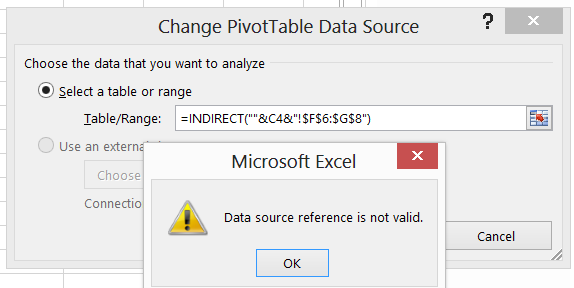
in C4 we have a name of the Sheet
Date
Votes
1 comment
-

Jet Reports Historic Posts I think you're hitting an order of operations issue - my understanding is that the order is as follows:
1. NL(Sheets) - for all sheets
2. NL(Columns) - for each sheet
3. NL(Rows) - for each sheet
I'm assuming that your pivot tables are all on a single sheet, and the C4 reference for the worksheet name is generated using a ROWS command
In that case, Rows command has not yet run when the sheets are generated.
I have found for my reports that pivot tables are best housed on the page they are referencing.
The other option is to break the report into several smaller increments - one for each sheet with it's corresponding pivot table. (Which is not always feasible, I know)
Please sign in to leave a comment.